How to Convert PNG to ICO in 3 Steps
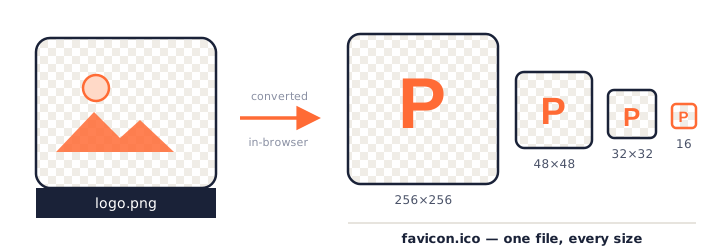
Converting PNG to ICO with this tool takes seconds, and nothing is sent over the internet — the whole conversion happens on your own device.
- Add your PNG images
Drag and drop one or more PNG files into the box above, click to browse, or paste an image straight from your clipboard with
Ctrl+V. JPG, WebP, GIF, and BMP inputs work too. - Pick your icon sizes
Choose which resolutions to include — from 16×16 up to 256×256. Every size you check is bundled into a single multi-size ICO file, and the live preview shows exactly how each one will look.
- Download your ICO file
Click Download ICO and the finished icon is saved instantly — the whole PNG to ICO conversion runs locally, so there is no queue and no waiting. Converting several images at once? Use Download All to grab everything as one zip.
Why Convert PNG to ICO?
PNG is the format designers export, but it is not the format icons actually ship in. If you searched for “png to ico”, you almost certainly hit one of these three situations:
- Website favicons. The little icon in a browser tab is traditionally a
favicon.icofile. Every major browser still requests/favicon.icoby default, and a single ICO covers tabs, bookmarks, and address-bar history in one file. - Windows application icons. Desktop programs, shortcuts, and folders on Windows use the ICO format exclusively. If you are building an app — or just customizing a folder icon — you need to change your PNG into ICO first.
- Software distribution. Installers, executables, and Electron or Tauri apps all expect an icon resource in ICO format, usually with several embedded sizes.
In every case the underlying need is the same: take one PNG design and package it so that Windows or the browser can display it crisply at any size. That packaging step is exactly what a PNG to ICO converter does.
What Is an ICO File?
An ICO file is a Microsoft icon container format that stores one image at multiple resolutions — typically 16×16 through 256×256 pixels — so Windows and web browsers can pick the sharpest version for any display context.
That one-sentence definition hides a clever design. Instead of forcing the operating system to scale a single bitmap up and down (which produces blurry taskbar icons and jagged desktop icons), the ICO format lets the designer supply a hand-tuned image for each size. Internally, an ICO begins with a small directory header that lists every embedded image, followed by the image data itself. Since Windows Vista, entries — and, per the specification, any 256×256 entry — can be stored as compressed PNG data inside the container, which keeps modern icon files surprisingly small.
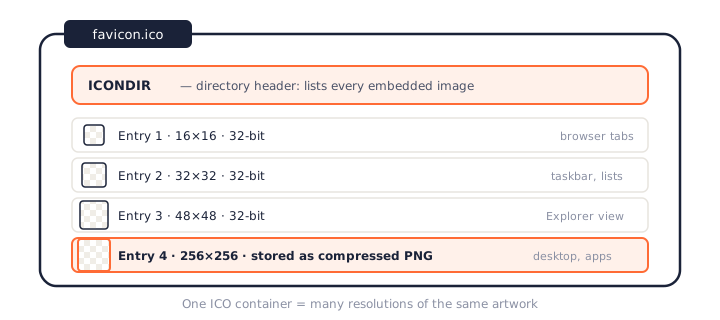
This is why simply renaming logo.png to logo.ico never works: the
file is still a PNG inside, with no icon directory, and Windows will refuse to display it. A
real conversion from PNG to ICO has to decode the image, resample it to each target size, and
write a proper icon directory — which is what happens under the hood every time you use the
converter above.
ICO Sizes Explained: 16×16 to 256×256
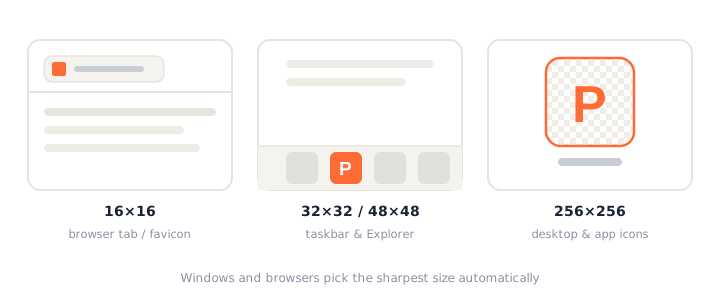
Choosing sizes is the only real decision when you convert PNG to ICO, and it is easier than it looks. Microsoft's own design guidance recommends shipping app icons in at least 16, 24, 32, 48, and 256 pixels, and this table shows where each size actually appears:
| Size | Where it is used | Include it when… |
|---|---|---|
| 16×16 | Browser tabs, Windows taskbar list, title bars | Always — this is the most-displayed icon size on the web |
| 24×24 | Windows small toolbar icons | Building Windows desktop software |
| 32×32 | Bookmarks, desktop “small icons” view, taskbar | Always — the default favicon fallback |
| 48×48 | Windows Explorer default icon view | Always for app icons; useful for favicons |
| 64×64 | High-DPI Explorer views | Targeting high-DPI Windows displays |
| 128×128 | Large icon views, some launchers | You want extra headroom between 64 and 256 |
| 256×256 | Windows “extra large” view, modern app icons | Always for apps; stored as PNG so it stays small |
When in doubt, the default selection — 16, 32, 48, and 256 — covers favicons and Windows icons in one file. Because the 256-pixel layer is PNG-compressed inside the ICO container, including it rarely adds more than a few kilobytes.
PNGConvert vs Other PNG to ICO Converters
Plenty of sites will change PNG to ICO, so the honest question is what makes this one worth bookmarking. The short answer: most popular converters upload your image to a server, limit file sizes, or hide size options — and none of the big names do all three of the things this tool treats as table stakes.
| PNGConvert | CloudConvert | Convertio | FreeConvert | |
|---|---|---|---|---|
| Conversion happens | In your browser | On their servers | On their servers | On their servers |
| Files uploaded | Never | Yes | Yes | Yes |
| Selectable sizes 16–256 | Yes, all seven | No | No | Windows presets only |
| Batch conversion | Yes, 50 files at once | Limited free minutes | Limited free tier | Yes, with queue |
| Account required | No | For heavy use | For heavy use | For some features |
| Works offline | Yes | No | No | No |
To be fair, server-based platforms like CloudConvert and Convertio support hundreds of format pairs, and if you need OCR or video transcoding they are excellent. But for the specific job of converting PNG to ICO, uploading your artwork to a third party buys you nothing — the browser you are using right now can do the entire conversion locally, faster than a round trip to anyone's server.
PNG vs ICO: Format Differences
The two formats solve different problems, which is why converting between them exists at all. PNG (Portable Network Graphics) is a single-image format with lossless compression and full alpha transparency — ideal for logos and screenshots, and the natural export format from Figma, Photoshop, or any design tool. ICO is not an image format so much as an icon package: a directory of several images, at several sizes, bundled for the operating system to choose from.
A useful mental model: PNG is the artwork, ICO is the delivery vehicle. You design once in PNG, then convert PNG to ICO to ship that design everywhere Windows and browsers expect an icon. Transparency survives the trip untouched, because modern ICO entries store 32-bit pixels — and, for larger sizes, literally embed PNG data.
What to Do With Your ICO File After Converting
The PNG to ICO conversion is usually the middle of a job, not the end of it. Here is how to put the downloaded file to work in the three most common scenarios.
Install it as a website favicon
Upload the file to the root of your site as favicon.ico, then reference it in
your HTML <head>:
<link rel="icon" href="/favicon.ico" sizes="32x32">
Browsers will request /favicon.ico from the site root even without the tag, so
the filename and location matter more than the markup. After deploying, hard-refresh the page
— browsers cache favicons aggressively, and an old icon can linger for days if you skip this.
Use it as a Windows folder or shortcut icon
Right-click any folder or shortcut, choose Properties → Customize → Change Icon, and browse to your new ICO file. Because the converter packs multiple resolutions into one file, the icon stays sharp whether Explorer shows it at 16 pixels in a list or 256 pixels in extra-large view. This is the single most common reason people convert PNG to ICO on Windows.
Ship it inside an application
Desktop frameworks expect a multi-size ICO as the app icon: Electron's
win.icon, Tauri's icons/icon.ico, and classic Win32 resource files
all consume the exact file this PNG to ICO converter produces. Include every size from 16 to
256 so installers, taskbars, and Alt-Tab switchers each get a crisp version.
Frequently Asked Questions
Is this PNG to ICO converter really free?
Yes. Every feature on this page — multi-size output, batch conversion, previews, style options — is completely free, with no usage caps, watermarks, or paid tiers. You will never be asked to create an account.
Do my files get uploaded to a server?
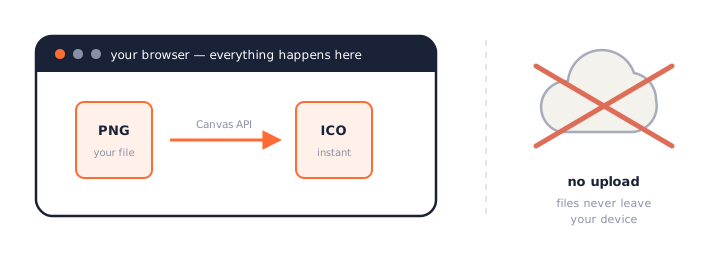
No. This tool converts PNG to ICO entirely inside your browser using the HTML5 Canvas API. Your images never leave your device, which also means the converter keeps working even if you go offline. See our privacy policy for details.
What ICO sizes should I choose for a favicon?
For a website favicon, include 16×16, 32×32, and 48×48 — browsers pick the best match from the bundle. If the same icon might ever be used as a Windows desktop or app icon, add 256×256 as well; it costs only a few extra kilobytes. That default is exactly what this PNG to ICO converter pre-selects.
How do I convert PNG to ICO on Windows 10 or 11?
Windows has no built-in option to save a PNG as ICO — renaming the extension does not create a valid icon file. The fastest method is a browser tool like this one: open the page, drop in your PNG, and download the ICO. It works the same on Windows 10, Windows 11, macOS, and Linux. For every route — including a PowerShell script that needs nothing installed — see our guide to converting PNG to ICO on Windows 11 and 10; to put the finished icon on a shortcut and fix it if Windows reverts it, the JPG to ICO on Windows guide covers those steps.
Can I convert multiple PNG files to ICO at once?
Yes. Drop in up to 50 PNG images at a time — each file gets its own row and its own ICO output, with no file size limit. Use the Download All button to save every icon in a single zip archive.
Will transparency be preserved?
Yes. PNG alpha transparency is carried over into the ICO file at full 32-bit depth, so soft shadows, anti-aliased edges, and fully transparent backgrounds all survive the PNG to ICO conversion exactly as designed. Starting from a JPEG instead? JPG cannot store transparency at all, so use the JPG to ICO converter — it can drop a solid background as it converts.
What is the difference between ICO and PNG?
A PNG holds exactly one image at one resolution, while an ICO is a container that stores several resolutions of the same artwork in one file. Windows and browsers then select whichever size fits the context — taskbar, desktop, browser tab — which is why icons ship as ICO rather than plain PNG.
How do I convert ICO back to PNG?
You need the reverse tool: our free ICO to PNG converter, which unpacks each embedded resolution as a separate PNG image. It shows you every size inside the file and lets you pick which ones to keep — and like this page, it runs entirely in your browser.
More Free Converter Tools
PNG to ICO is the first of a growing family of free, in-browser conversion tools on pngconvert.net — same privacy promise, no accounts, no uploads:
Crop a photo square, drop its background, and get a Windows icon.
SVG to ICODraw a vector at every icon size, and see what it loses first.
WebP to ICOEvery size in one icon — and pick the frame if it is animated.
PNG to CURA Windows cursor with the click point set exactly — test it before you download.
PNG to ICNSA complete macOS icon — all ten Retina sizes, no Mac needed.
ICO to PNGExtract every size from an ICO file as separate PNG images.
WebP to PNGUnpack WebP to a transparent PNG — one frame, every frame, or an APNG.
SVG to PNGRasterize a vector to PNG at any size — 1x, 2x, 3x or a custom width.
AVIF to PNGTurn an AVIF your software won’t open into a PNG that works everywhere.
HEIC to PNGConvert iPhone HEIC photos to PNG in your browser — nothing uploaded.
GIF to PNGOne frame, every frame as a zip, or an animated PNG — you choose.
JPG to PNGLossless PNG from a JPG — and a flat background keyed to transparency.
PNG to WebPShrink PNG to WebP and watch the size drop live — lossy or lossless.
PNG to GIFA GIF encoded in your browser — one still, or several PNGs as one animation.
WebP to GIFAnimated WebP to a GIF that plays anywhere — every frame kept, Safari included.
PNG to JPGConvert PNG to JPG — pick what fills transparent areas, see the size drop.
WebP to JPGConvert WebP to a JPG that opens anywhere — you pick what fills the transparency.
HEIC to JPGConvert iPhone HEIC photos to small, shareable JPGs — nothing uploaded.
AVIF to JPGA JPG that every app and upload form accepts — with the real size change shown.
JFIF to JPGA JFIF is already a JPEG — rename it without losing a byte, or re-encode.
Favicon GeneratorOne logo in, the favicon files you actually need out.