How to Convert AVIF to PNG in 3 Steps
Converting AVIF to PNG is quick, and the tool above does it without uploading anything. Most people land here for one reason — something refuses to open their AVIF — so the steps are short.
- Add your AVIF
Drag it in, click to browse, or paste with
Ctrl+V. Add up to 50 files at once — nothing is uploaded, and the conversion runs on your device. - It converts on the spot
Each AVIF is decoded and re-drawn as a PNG right away, at full resolution with transparency intact. You will see the before-and-after size, because a PNG is larger than an AVIF.
- Download your PNG
Click Download PNG and it saves — a file that opens in any editor, viewer or upload form. A batch downloads as one zip.
Why Won't My Software Open AVIF Files?
This is the question behind almost every AVIF to PNG search, and it has a simple answer.
AVIF is new, and support is still catching up
AVIF is a modern image format built to be very small. It is excellent for websites, but it is recent enough that a lot of software has not learned to read it yet.
Older photo editors, some office and presentation apps, plenty of upload forms, and a few built-in image viewers still show an error or nothing at all. The file is fine — the program just does not speak AVIF.
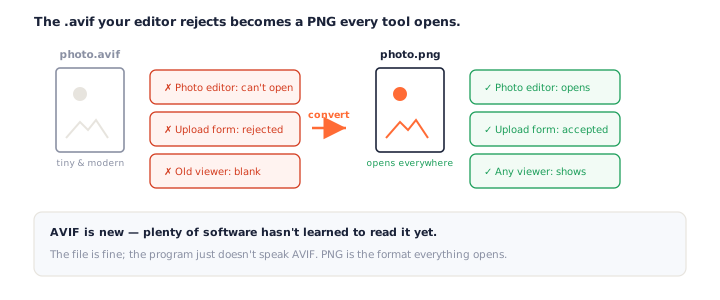
PNG is the format everything opens
PNG has been universal for decades. Converting AVIF to PNG trades the small file size for a file that every editor, viewer and form will accept — which is exactly the trade you want when something has already refused the AVIF.
If you have been searching how to open an AVIF file, this is the most reliable answer: rather than hunt for a plugin or a codec pack for one stubborn program, convert AVIF to PNG once and the image works in all of them. It takes a couple of seconds and nothing installs.
You most often meet AVIF by saving an image from a modern website — many sites now serve AVIF
automatically because it loads faster. You right-click, save, and end up with a .avif
you never asked for and your usual tools will not touch.
Does AVIF to PNG Lose Quality or Transparency?
No, and this is worth being precise about, because the answer surprises people.
Lossless container, transparency intact
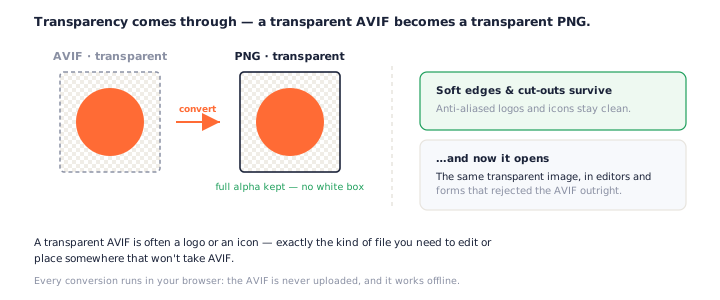
PNG is lossless, so converting AVIF to PNG copies the decoded pixels exactly — it adds no new loss. It also keeps full alpha, so a transparent AVIF becomes a transparent PNG. What it cannot do is restore detail a lossy AVIF already threw away; no converter can.
Why Your PNG Is Bigger Than the AVIF — and Why That's Correct
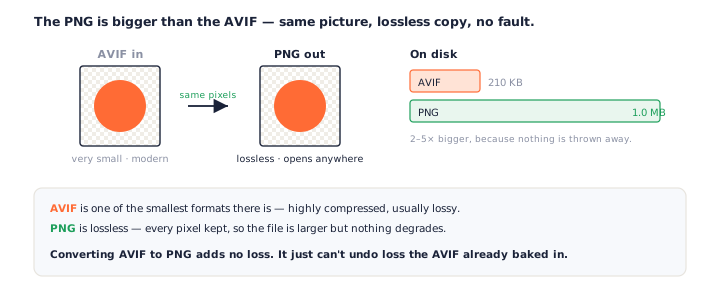
Expect the PNG to be larger, often much larger. That is not a bug.
Tiny lossy source, faithful lossless copy
AVIF is one of the smallest formats there is; PNG is one of the most faithful. So a 200 KB AVIF can become a 1 MB PNG that looks identical. The tool shows both numbers side by side, so the size is a fact you can see, not a surprise you discover later.
It is worth saying because the jump can look alarming. A file five times larger sounds like something went wrong, when in truth the PNG is simply storing everything the AVIF worked hard to compress. Same image, more bytes, wider support.
When to keep the AVIF instead
If the AVIF already works where it is going — a modern website, a recent browser — keep it; it is smaller and loads faster. Convert AVIF to PNG when you need to edit it or hand it to something that will not open it.
AVIF vs PNG: What the Difference Means for You
They sit at opposite ends of the trade-off between size and compatibility.
Size versus universal support
AVIF wins on size by a wide margin — smaller than JPEG, WebP and PNG. PNG wins on support: it opens in everything, keeps transparency, and never loses a pixel. Converting AVIF to PNG is you choosing support over size for this particular file.
For an ordinary photo with nothing see-through in it, a JPG gives the same compatibility at a fraction of the PNG's size — use the AVIF to JPG converter instead.
Where each belongs
Ship AVIF on the web, where small files speed up pages. Reach for PNG when you need to edit, archive, or hand the image to a tool that only takes common formats.
A useful rule: keep AVIF for delivery and use PNG for working. The moment an image has to leave the browser — into an editor, a document, a form, an older device — converting AVIF to PNG is what makes it usable, and you lose nothing you can see in the process.
Browser Support: Why This Works Without Uploading
This converter leans on your browser’s own AVIF decoder, which is why nothing has to be sent to a server.
Chrome, Edge, Firefox and recent Safari
Modern browsers read AVIF natively — Chrome and Edge since 2020, Firefox, and Safari 16 and up. If a browser cannot decode a file, the tool says so plainly instead of failing silently, and you can try a current browser.
Because the decoding is the browser’s own, converting AVIF to PNG here needs no server round trip and no software install. That is also why it keeps working with your Wi-Fi off — the whole job happens on your machine.
Private by Design: Nothing Is Uploaded
Every conversion runs locally. The AVIF is decoded and the PNG is built in your browser — it is never sent anywhere, there is no queue, and it works offline.
How to check we're telling the truth
Open your browser's developer tools, switch to the Network tab, and convert an AVIF to PNG — you will not see your file leave. Or turn off your Wi-Fi and try again; it still works.
Frequently Asked Questions
Is this AVIF to PNG converter really free?
Yes, completely. No signup, no watermark, no daily cap. Every AVIF to PNG conversion runs on your own device, so there is nothing to meter.
Do my files get uploaded when I convert AVIF to PNG?
No. The AVIF is decoded and re-encoded as PNG in your browser, so it never leaves your device and the tool works offline. Open the Network tab while you convert and you will not see an upload. See our privacy policy.
Why won’t my software open AVIF files?
AVIF is a new format, and many programs — older photo editors, some office and presentation apps, upload forms, and a few operating-system viewers — have not added support yet. Converting AVIF to PNG gives you a file every one of them accepts.
Does converting AVIF to PNG keep transparency?
Yes, at full alpha. AVIF and PNG both support transparency, so a transparent AVIF becomes a transparent PNG with soft edges and cut-outs intact. Nothing is flattened onto white.
Why is my PNG bigger than the AVIF?
Because AVIF is a highly compressed, usually lossy format, and PNG is lossless. The PNG keeps every pixel exactly, so it is often two to five times larger. That is the format doing its job, not a fault in the conversion.
Will AVIF to PNG lose quality?
No new quality is lost — PNG stores exactly the pixels it is given. What it cannot do is rebuild detail a lossy AVIF already discarded. The PNG looks identical to the AVIF; it is just larger.
My AVIF is animated — what do I get?
AVIF can be animated, though it is rare. This tool converts the first frame to a PNG. Full frame-by-frame control for animated AVIF is on the way; for now, an animated file gives you a clean still.
Can I convert multiple AVIF files to PNG at once?
Yes, up to 50. Each gets its own card, and Download All saves every PNG as one zip. Batch AVIF to PNG conversion runs entirely in your browser.
More Free Converter Tools
This AVIF to PNG converter is part of a family of free, in-browser tools on pngconvert.net. Working with WebP instead? The WebP to PNG converter does the same for that format:
Turn PNG images into multi-size Windows icons and favicons.
JPG to ICOCrop a photo square, drop its background, and get a Windows icon.
SVG to ICODraw a vector at every icon size, and see what it loses first.
WebP to ICOEvery size in one icon — and pick the frame if it is animated.
PNG to CURA Windows cursor with the click point set exactly — test it before you download.
PNG to ICNSA complete macOS icon — all ten Retina sizes, no Mac needed.
ICO to PNGExtract every size from an ICO file as separate PNG images.
WebP to PNGUnpack WebP to a transparent PNG — one frame, every frame, or an APNG.
SVG to PNGRasterize a vector to PNG at any size — 1x, 2x, 3x or a custom width.
HEIC to PNGConvert iPhone HEIC photos to PNG in your browser — nothing uploaded.
GIF to PNGOne frame, every frame as a zip, or an animated PNG — you choose.
JPG to PNGLossless PNG from a JPG — and a flat background keyed to transparency.
PNG to WebPShrink PNG to WebP and watch the size drop live — lossy or lossless.
PNG to GIFA GIF encoded in your browser — one still, or several PNGs as one animation.
WebP to GIFAnimated WebP to a GIF that plays anywhere — every frame kept, Safari included.
PNG to JPGConvert PNG to JPG — pick what fills transparent areas, see the size drop.
WebP to JPGConvert WebP to a JPG that opens anywhere — you pick what fills the transparency.
HEIC to JPGConvert iPhone HEIC photos to small, shareable JPGs — nothing uploaded.
AVIF to JPGA JPG that every app and upload form accepts — with the real size change shown.
JFIF to JPGA JFIF is already a JPEG — rename it without losing a byte, or re-encode.
Favicon GeneratorOne logo in, the favicon files you actually need out.