Soft edges flatten onto:
Settings changed — click Re-convert.
Convert PNG to GIF right in your browser — a still GIF from one image, or an animated GIF from several. Nothing uploads: the GIF is encoded on your device, and the page is honest about what 256 colours will do.
Click to browse or drag and drop
.png files — add several to build an animated GIF, up to 50
You can also paste with Ctrl+V
Settings changed — click Re-convert.
A PNG to GIF conversion is technically a downgrade — you are moving into a 256-colour format from 1989 — so this page does two things at once: it converts, and it tells you exactly what the format is about to do to your image. Here is the short version.
Drag them in, click to browse, or paste with Ctrl+V. One PNG converts to a still GIF; add two or more and you can also combine them into an animated GIF. Nothing uploads — the GIF is encoded on your device.
The card tells you how many colours your PNG really has against GIF’s 256, and if the image has soft transparent edges you pick the matte colour they flatten onto — white, black, or any colour — instead of getting a surprise halo.
Click Convert to GIF — the PNG to GIF conversion runs on your device — and compare sizes before and after. For an animation, choose the frame delay and hit Combine into animated GIF; the result plays right in the page before you download it.
Half of the people searching png to gif do not want a still image at all — they have a handful of PNG frames and want one animated GIF for a chat, a forum, or a README. Search engines know it too: the top result for this keyword is an animation tool, not a converter.
So the animation builder is not a separate product here. Add two or more PNG files and it appears under the list:
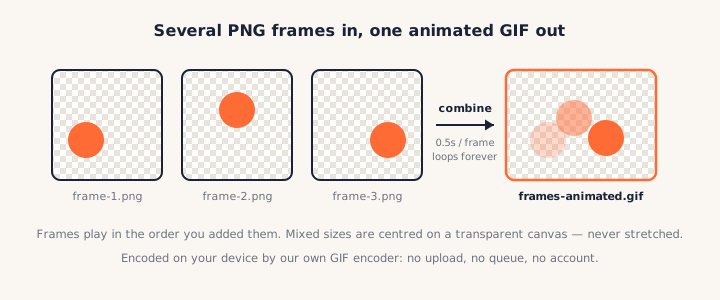
The finished animation plays inside the page before you download it — a GIF preview that does not move would prove nothing. And because the encoder runs locally, a 30-frame png to gif animation costs you seconds of nothing uploading, not a queue on someone's server.
Converting PNG to GIF re-draws a 24-bit image — up to 16.7 million colours — with a palette of at most 256. Colours are merged to the closest survivors, and dithering scatters the two nearest shades to fake the ones that no longer exist.
That single sentence is the whole quality story, and it is why the card shows a colour count before you convert. The number tells you which of two conversions you are about to get:
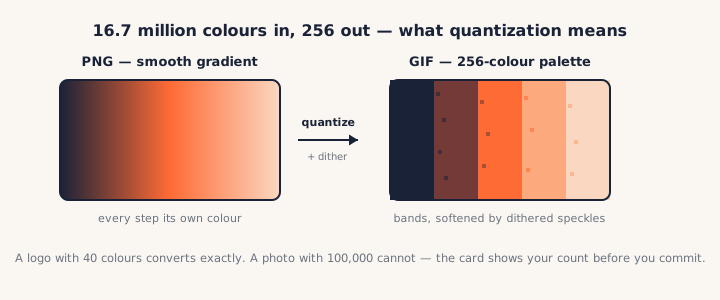
The size line after each png to gif conversion tells the same truth from the other side: a GIF is often smaller than the PNG precisely because the colours are gone. Smaller is not optimised — it is quantised. If small is the actual goal, a PNG to WebP conversion gets you there without the palette.
PNG has 256 levels of transparency per pixel; GIF has two: fully visible or fully gone. Every PNG to GIF converter has to do something about the pixels in between — the soft anti-aliased edges, the drop shadows — and most do it silently, which is where the infamous white halo comes from.
Here it is a visible choice instead:
Matching the matte to the destination background is the entire trick: a soft edge flattened onto the same blue it will sit on is invisible; flattened onto the wrong white, it is a halo. Most PNG to GIF tools never ask — they picked white for you. If you need real soft transparency in a small animated file, that is what APNG is for — our GIF to PNG converter makes those in the other direction.
Honest answer: for a still image, a PNG to GIF conversion is rarely worth it. PNG is
younger, lossless, true-colour, and
properly transparent. A still GIF wins only on compatibility with software and platforms
that predate PNG or insist on .gif — old forum avatars, legacy CMSes, systems
that sniff the extension.
The conversions that actually make sense:
We checked the tools ranking for png to gif and compared what actually differs. The short version: every one of them uploads your file to a server, and almost none of them mention the 256-colour ceiling or what happens to soft edges.
| PNGConvert | ezgif | Convertio | FreeConvert | Canva | |
|---|---|---|---|---|---|
| Runs locally, no upload | ✓ | ✗ (200 MB, deleted "after 1 hour") | ✗ (server) | ✗ (server) | ✗ (server) |
| Animated GIF from PNGs | ✓ same page | ✓ separate maker | ✗ | ✓ in options | Via editor |
| Matte colour for soft edges | ✓ your choice | ✗ | ✗ (flattens silently) | ✗ | ✗ |
| Colour count shown up front | ✓ | ✗ | ✗ | ✗ | ✗ |
| Free without account | ✓ | ✓ | Batch is paid | Signup over 1 GB | Account required |
Local encoding is what separates this PNG to GIF converter from a promise: it is the difference between a policy and physics. An uploaded file is protected by a policy; a file that never leaves your machine is protected by physics.
Open your browser's developer tools, watch the Network tab, and convert a PNG to GIF — no request carries your image. Turn the connection off entirely and the encoder keeps working.
Yes — no signup, no watermark, no batch conversion locked behind a paid plan. The whole PNG to GIF conversion runs in your browser with our own GIF encoder, so there is no server bill for us to pass on and nothing for us to meter.
No, and on this keyword that is rare: every converter ranking alongside us sends your file to a server and deletes it "later". Here the GIF is encoded on your device — check the Network tab while converting, or go offline and try. See our privacy policy.
If it has more than 256 colours, yes — every png to gif conversion merges colours down to GIF’s ceiling (with dithering to hide the banding). The card shows your PNG’s real colour count up front: a flat-colour logo often converts exactly, a photo visibly does not. For photos, a JPG or WebP is the better small file.
GIF transparency is on/off per pixel, so fully transparent areas stay transparent. Semi-transparent pixels — soft anti-aliased edges, shadows — cannot survive and are flattened onto a matte colour. Here you choose that colour to match the background where the GIF will sit, which is what prevents the classic white halo.
Add two or more PNGs and the png to gif animation builder appears. Frames play in the order you added the files; pick a frame delay from 0.1s to 1s, click Combine into animated GIF, and the finished GIF plays in the page. Differently sized frames are centred on a transparent canvas, never stretched.
Yes — that compatibility is usually the whole point of converting. Note that Discord expects emoji and stickers under set size limits (classic advice is to keep animated emoji under 256KB and uploads under the server tier cap), so watch the size readout; fewer frames and smaller dimensions shrink a GIF fast.
Usually the opposite happens — 256 colours cost fewer bytes than millions. But a large, noisy, dithered image can compress poorly under GIF’s 1989-era LZW scheme. The size line shows both numbers so you can judge; if the goal is just a smaller still image, PNG to WebP beats GIF every time.
With the mirror tool: the GIF to PNG converter. It runs in the browser the same way, and if the GIF is animated you can take one frame, every frame as a zip, or keep it moving as an animated PNG.
This PNG to GIF converter is part of a family of free, in-browser tools on pngconvert.net — same privacy promise, no accounts, no uploads:
Turn PNG images into multi-size Windows icons and favicons.
JPG to ICOCrop a photo square, drop its background, and get a Windows icon.
SVG to ICODraw a vector at every icon size, and see what it loses first.
WebP to ICOEvery size in one icon — and pick the frame if it is animated.
PNG to CURA Windows cursor with the click point set exactly — test it before you download.
PNG to ICNSA complete macOS icon — all ten Retina sizes, no Mac needed.
ICO to PNGExtract every size from an ICO file as separate PNG images.
WebP to PNGUnpack WebP to a transparent PNG — one frame, every frame, or an APNG.
SVG to PNGRasterize a vector to PNG at any size — 1x, 2x, 3x or a custom width.
AVIF to PNGTurn an AVIF your software won’t open into a PNG that works everywhere.
HEIC to PNGConvert iPhone HEIC photos to PNG in your browser — nothing uploaded.
GIF to PNGOne frame, every frame as a zip, or an animated PNG — you choose.
JPG to PNGLossless PNG from a JPG — and a flat background keyed to transparency.
PNG to WebPShrink PNG to WebP and watch the size drop live — lossy or lossless.
WebP to GIFAnimated WebP to a GIF that plays anywhere — every frame kept, Safari included.
PNG to JPGConvert PNG to JPG — pick what fills transparent areas, see the size drop.
WebP to JPGConvert WebP to a JPG that opens anywhere — you pick what fills the transparency.
HEIC to JPGConvert iPhone HEIC photos to small, shareable JPGs — nothing uploaded.
AVIF to JPGA JPG that every app and upload form accepts — with the real size change shown.
JFIF to JPGA JFIF is already a JPEG — rename it without losing a byte, or re-encode.
Favicon GeneratorOne logo in, the favicon files you actually need out.