How to Convert WebP to GIF in 3 Steps
You saved an animation and got a .webp that will not move in the app you wanted to use. A WebP to GIF conversion turns it into the one animated format that plays nearly everywhere, and the tool above does it without uploading the file.
- Add your WebP files
Drop animated WebP files or stickers into the box above, or paste one with
Ctrl+V. Each row shows the frame count, the length, the loop setting and an estimate of the GIF size before anything is converted. - Choose what soft edges become
A GIF pixel is either solid or invisible, so pick the colour the GIF will sit on — white, dark or your own — or a hard cut that works on any background.
- Convert and download
Press Convert to GIF. Open a row to watch the WebP and the finished GIF play side by side, then download the GIF, or every GIF as one zip.
A still WebP to GIF conversion works too: it becomes a single-frame GIF. For a still picture, though, a PNG or JPG is usually the better target.
WebP to GIF on Android, iPhone, Windows and Mac
There is no app to install. Open this page in any current browser and the WebP to GIF converter runs on the device you are holding — the frames are never sent anywhere.
On Android or iPhone, tap the box and choose the file from Files or Downloads; the GIF lands back in the same place. On a Windows PC or Mac, drag the files in from a folder.
It even works offline. Load the page once while connected, and a WebP to GIF conversion on a plane or a train behaves exactly the same.
Why Are GIFs Saving as WebP?
Because the site sent you a WebP. Large GIF libraries no longer serve GIF files to browsers that can play something smaller. GIPHY's own developer guide tells apps to use MP4 or WebP and says plainly: "Do not use the GIF format." Stickers, it adds, should be WebP.
So when you right-click an animation and choose Save image as, the file you get is whatever the page was showing — an animated WebP — even though it looked like a GIF.
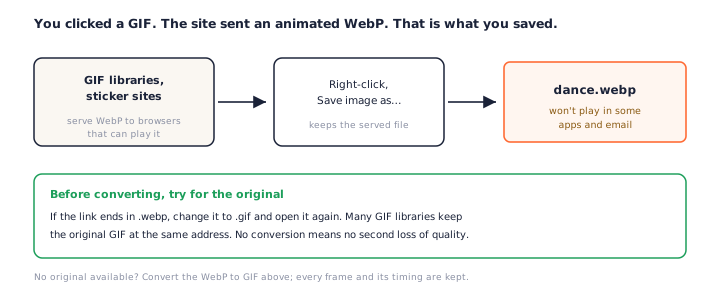
Try for the original GIF first
If the link to the image ends in .webp, change it to .gif and open it
again. Many GIF libraries keep the original GIF at the same address. Fetching it beats any
WebP to GIF conversion, because the picture is not compressed a second time.
No original available? Then a WebP to GIF conversion is the way. If the image you saved is a still WebP rather than an animation, convert the WebP to JPG instead.
Will the GIF Keep the Animation?
Yes — a WebP to GIF conversion here keeps every frame, each frame's own duration, and the loop setting. What differs between browsers is only how the frames are read, and the converter says which route it used for each file.
| Browser | How the frames are read |
|---|---|
| Chrome, Edge 94+ | The browser's own frame decoder |
| Firefox 133+ | The browser's own frame decoder |
| Safari (Mac, iPhone, iPad) | This page's built-in WebP reader |
Safari has no frame decoder for web pages yet (it exists only in Technology Preview as of October 2026), so other in-browser tools give Safari users the first frame and stop. This page reads the WebP container itself, decodes each frame as a still image and rebuilds the animation, so a WebP to GIF conversion on an iPhone keeps its motion.
Timing and loops
GIF stores frame delays in hundredths of a second. Frames shorter than 20 ms are usually stretched to 100 ms by browsers, so a very fast animation plays slower as a GIF — those files are flagged before the WebP to GIF conversion starts. The loop setting carries over: forever, or a set number of plays.
Why the GIF Is Several Times Bigger
WebP compresses animation far better than GIF, which dates from 1987 and allows 256 colours per frame. Google measured animated GIFs at 64% smaller as lossy WebP and 19% smaller as lossless WebP. Converting WebP to GIF gives that saving back.
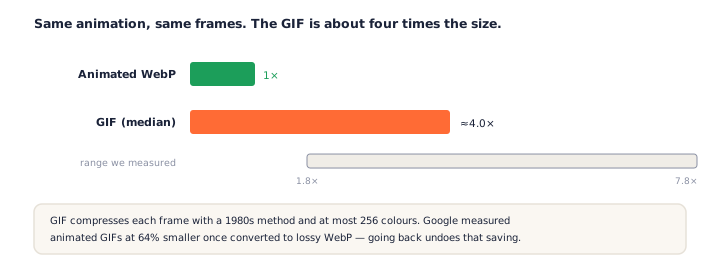
In our WebP to GIF tests with five real animations — four from GIPHY, one of Google's samples — the GIF came out between 1.8 and 7.8 times the WebP, with a median of 4.0. Each row shows an estimate before converting and the real figure after, so a size limit is never a surprise.
One honest caveat: this converter writes every frame of the GIF in full. Desktop tools that store only the part of each frame that changed can produce smaller GIFs from the same animation, at the cost of an upload or an install.
Transparency and the 256-Colour Limit
A GIF can do less than a WebP in two ways, and both show up in every WebP to GIF result. The settings above the list decide how they are handled for every file.
Soft edges need a colour
WebP stores smooth, partial transparency. A GIF pixel is either fully solid or fully invisible. So the half-transparent pixels around an animated sticker must either be blended into a colour or cut.
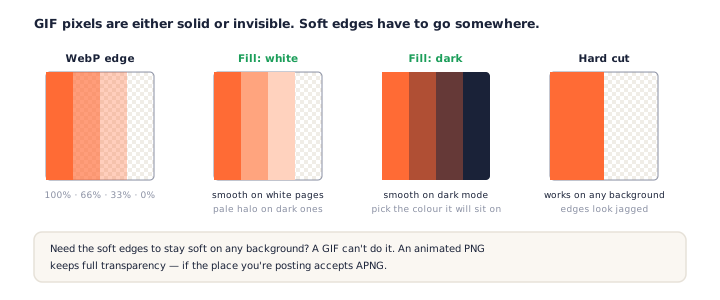
Pick White for light pages, Dark for dark mode, or Colour to match a specific chat background. Hard cut keeps every pixel that is at least half opaque and drops the rest: jagged, but it works on any background. Most WebP to GIF converters choose for you without saying which.
256 colours per frame
Each GIF frame gets its own palette of up to 256 colours, picked from that frame's pixels. Dithering, on by default, mixes palette colours in fine patterns so gradients do not band. Turn it off for flat cartoons, where it only adds noise and size.
Need smooth transparency and full colour? An animated PNG has both, if the place you are posting accepts it — keep full transparency as an animated PNG.
Turning a WhatsApp Sticker into a GIF
WhatsApp stickers are animated WebP files: 512 × 512 pixels, at most 10 seconds and 500 KB, according to WhatsApp's own sticker specification. That makes them one of the most common reasons people search for WebP to GIF.
Get the sticker file onto your computer or into your phone's Files app, drop it into the WebP to GIF converter, and pick White or Dark to match where the GIF will be shown. The GIF keeps the sticker's frames and timing. Expect it to be several times larger than the 500 KB sticker.
Making GIFs from your own images rather than stickers? The PNG to GIF converter turns a set of PNGs into an animation, and GIF to PNG goes the other way. Our list of free browser tools for creators has more.
Frequently Asked Questions
Is this WebP to GIF converter free? Is there a file limit?
This WebP to GIF converter is free, with no account and no watermark. Add up to 50 files at once; there is no size cap, because the conversion runs on your device. Very long animations are limited by memory, and the row tells you if only the first part fits.
Are my files uploaded?
No. Your browser reads every frame and encodes the GIF locally; nothing is sent to a server. Once the page has loaded it works offline.
Does it keep the animation, timing and loop?
Yes. In a WebP to GIF conversion here, every frame keeps its own duration, and the loop setting carries over — forever, or a set number of plays. Frames shorter than 20 ms are flagged, because browsers slow those down in a GIF.
Why is my GIF so much bigger than the WebP?
GIF is a much older format with weaker compression and at most 256 colours per frame. Google measured animated GIFs at 64% smaller once converted to lossy WebP, so going back the other way makes the file several times larger — a median of four times in our tests. The row estimates it before you convert.
Why does my GIF have white or jagged edges?
GIF transparency is on or off, nothing in between, so semi-transparent edges must be blended into a colour or cut. Choose the fill that matches where the GIF will appear, or Hard cut for any background.
Does it work on iPhone and in Safari?
Yes. Safari has no built-in frame decoder for animated WebP, so this WebP to GIF converter reads the frames itself and rebuilds the animation — something the other in-browser converters we tested could not do.
Can I convert a WhatsApp sticker to GIF?
Yes. WhatsApp stickers are animated WebP files, 512 × 512 and no longer than 10 seconds. Save the sticker file, drop it here, and you get a GIF of the same animation.
Is a GIF the best choice, or should I use an animated PNG?
If the place you are posting accepts animated PNG, it keeps full colour and smooth transparency. The WebP to PNG converter can make one. GIF is the choice when it simply has to play everywhere.
More Free Converter Tools
This WebP to GIF converter is part of a family of free, in-browser tools on pngconvert.net — same privacy promise, no accounts, no uploads:
Turn PNG images into multi-size Windows icons and favicons.
JPG to ICOCrop a photo square, drop its background, and get a Windows icon.
SVG to ICODraw a vector at every icon size, and see what it loses first.
WebP to ICOEvery size in one icon — and pick the frame if it is animated.
PNG to CURA Windows cursor with the click point set exactly — test it before you download.
PNG to ICNSA complete macOS icon — all ten Retina sizes, no Mac needed.
ICO to PNGExtract every size from an ICO file as separate PNG images.
WebP to PNGUnpack WebP to a transparent PNG — one frame, every frame, or an APNG.
SVG to PNGRasterize a vector to PNG at any size — 1x, 2x, 3x or a custom width.
AVIF to PNGTurn an AVIF your software won’t open into a PNG that works everywhere.
HEIC to PNGConvert iPhone HEIC photos to PNG in your browser — nothing uploaded.
GIF to PNGOne frame, every frame as a zip, or an animated PNG — you choose.
JPG to PNGLossless PNG from a JPG — and a flat background keyed to transparency.
PNG to WebPShrink PNG to WebP and watch the size drop live — lossy or lossless.
PNG to GIFA GIF encoded in your browser — one still, or several PNGs as one animation.
PNG to JPGConvert PNG to JPG — pick what fills transparent areas, see the size drop.
WebP to JPGConvert WebP to a JPG that opens anywhere — you pick what fills the transparency.
HEIC to JPGConvert iPhone HEIC photos to small, shareable JPGs — nothing uploaded.
AVIF to JPGA JPG that every app and upload form accepts — with the real size change shown.
JFIF to JPGA JFIF is already a JPEG — rename it without losing a byte, or re-encode.
Favicon GeneratorOne logo in, the favicon files you actually need out.