How to Convert WebP to ICO in 3 Steps
Converting WebP to ICO is quick. The interesting part is what you get at the end — because most converters hand back something that is technically an ICO and practically half of one.
Two things decide whether a WebP to ICO conversion was worth doing: whether every size you need ended up in the file, and — if your WebP moves — whether anyone asked you which frame to keep. Both are covered below, and both are places the popular tools quietly fall short.
- Add your WebP
Drag it in, click to browse, or paste with
Ctrl+V. Animated WebP files are welcome — up to 50 files at once, no size limit, nothing uploaded. - Pick your sizes — and your frame
Every size you tick goes into one icon file. If your WebP is animated, the filmstrip shows every frame so you can choose which one becomes the icon instead of silently getting the first.
- Download one ICO
Click Convert to ICO and you get a single file holding 16, 32, 48 and 256 pixel versions. That is one WebP to ICO conversion, not four.
One File, Every Size — What Most Converters Miss
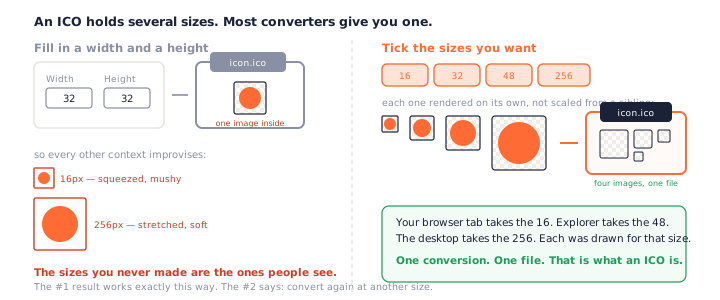
An ICO is not an image format. It is a container that holds the same artwork at several sizes, so Windows and browsers can each take the one they need.
What an ICO is supposed to be
A 16-pixel icon and a 256-pixel icon are not the same picture scaled. Each is rendered on its own, so the small one stays legible and the large one stays sharp. One file, several images, chosen at display time. That is the entire reason the format exists.
Which means a WebP to ICO converter has one job beyond changing the file extension: render
your image several times, at several sizes, and pack them together. Renaming a single 32-pixel
image to .ico is not a conversion. It is a rename with extra steps.
What the top-ranked converters actually hand you
This is worth checking before you trust any WebP to ICO converter with your logo. The highest-ranking one asks for a width and a height — two number fields, defaulting to 32 — and returns an ICO holding exactly one image.
The second answers its own FAQ, “Can I include multiple sizes in one ICO?”, with the advice to convert your WebP again at different dimensions. On the same page it explains that an ICO bundles multiple images in one container. It knows. It just does not do it.
The third has no size control at all. You convert WebP to ICO and take what you are given.
Why it matters at 16 and 256
Ship a single 32-pixel image and every other context has to improvise. Your browser tab squeezes it to 16 and the detail turns to porridge; Windows stretches it to 256 for the desktop and it goes soft. The sizes you never generated are the ones people actually see.
You can test any WebP to ICO converter for this in a few seconds. Convert something, then look at what you downloaded: if the tool only ever asked you for one width and one height, there is one image in that file. Ours asks you to tick sizes instead, and every ticked box is another image inside the same download.
Animated WebP: Which Frame Becomes Your Icon?
WebP has a second life as an animation format — the modern replacement for the GIF. Which raises a question every WebP to ICO converter has to answer, and almost none answer out loud.
An icon cannot move
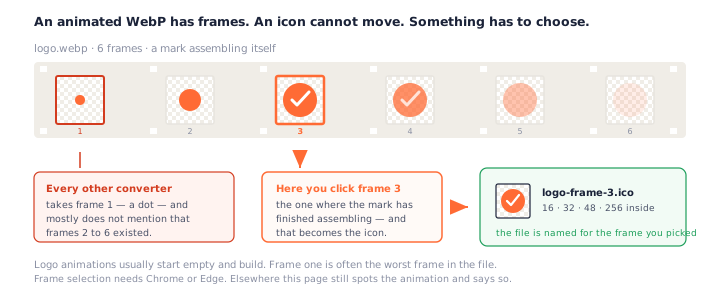
The ICO format has no concept of animation. So when an animated WebP goes in, exactly one frame has to come out, and something has to choose it.
This is not an edge case for WebP the way it would be for PNG. WebP replaced the GIF as the web's animation format, so a meaningful share of the WebP files people save are moving ones — and converting an animated WebP to ICO is a question with a right answer, not a technicality.
Converters take frame one and mostly say nothing
One of the tools in this space is an animation specialist — its whole site is GIF and WebP work. It states plainly that the first frame will be used. On its GIF page. Its WebP page does not mention it, and no converter we found lets you pick.
Frame one is often the worst possible choice. Logo animations usually start on an empty canvas or a single stroke and assemble as they go. The frame you want is somewhere in the middle.
Picking the frame yourself
Drop an animated WebP here and the filmstrip appears with every frame in it. Click one, and
the previews below update to show that frame at 16, 32, 48 and 256 pixels. The downloaded file
is even named for it — logo-frame-3.ico — so you know what you picked.
A static WebP does not get a filmstrip at all. There is nothing to choose, so the page does not invent a control for it — a WebP to ICO conversion of a still image should look as simple as it is.
When your browser cannot do this
Reading past frame one needs a browser API that today means Chrome or Edge. Elsewhere, this page still spots that your file is animated — it reads the container directly — converts frame one, and tells you that is what happened. It will not quietly pass an animation off as a still the way a silent converter does.
Why Everything You Download Is WebP Now
Almost nobody chooses to make a WebP. You right-click an image, save it, and get one — which is why WebP to ICO is a conversion that mostly happens by accident rather than by plan.
What sites gain
Roughly 25–35% smaller files than PNG or JPEG at similar quality, with transparency and animation supported in the same format. Every CMS and CDN converts on the way out, which is why your downloads folder is full of them and why WebP to ICO is a conversion people need at all.
Nobody sets out to make a WebP. You wanted a logo, you got a .webp, and now the
thing you wanted to use it for — a favicon, a shortcut icon — will not take it.
Why your editor may refuse it
Older versions of Photoshop, Windows Photo Viewer and a lot of desktop software still cannot open WebP, or need a plugin. The web moved first. That gap is exactly why a browser-based converter is the path of least resistance — the browser you already have understands WebP natively.
Lossy or Lossless? It Shows at 16 Pixels
Two formats wearing one name
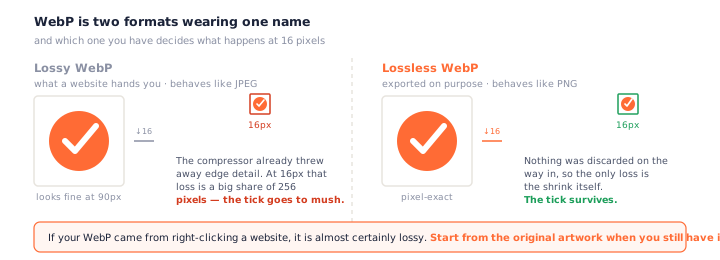
WebP is really two things, and no WebP to ICO converter can tell you which you have — only the file knows. Lossless WebP behaves like a PNG: pixel-exact, ideal for logos. Lossy WebP behaves like a JPEG: it discards detail, and around a hard edge it leaves the same faint mush JPEG does.
At full size you will never notice. At 16 pixels, where you have 256 pixels in total, that mush is a meaningful share of your icon. If your WebP came from a website, it is almost certainly lossy — start from the original artwork when you have it.
Do You Even Need This Page?
A fair question, and the honest answer is: sometimes not. A WebP to ICO converter is not always the right tool for the file in front of you.
If you still have the original PNG, use that
A website's WebP is a compressed copy of something. If the original artwork is still on your machine, the PNG to ICO converter starts from better pixels. Same sizes, same one file, no compression already baked in.
If a WebP is what you have
Then this page is the right one — especially if it is animated, or if you want every size in one file rather than converting WebP to ICO four separate times, once per dimension, and ending up with four files that do not know about each other.
Not after an icon at all? If you just need a plain, editable image, our WebP to PNG converter unpacks the same file to a transparent PNG instead — one frame, every frame, or an animated PNG.
Everything here runs in your browser: no upload, no queue, no daily cap, and it keeps working offline. That is not unique on this keyword — several other WebP to ICO converters are browser-based too, and that is a good thing rather than a selling point. What is unusual is what comes out the other end.
Frequently Asked Questions
Can I include multiple sizes in one ICO?
Yes — that is the default here, and it is the whole point of the format. Tick 16, 32, 48 and 256 and you get one file containing all four. It is worth asking this of any WebP to ICO converter before you use it: several of the most popular ones answer that you should convert your image several times, once per size, and stitch nothing together.
My WebP is animated — which frame do I get?
Whichever one you click. An animated WebP holds a sequence, an icon cannot move, so exactly one frame has to become the icon. Most converters take the first and never mention that the others existed. This page shows you the whole strip and lets you pick — the fifth frame is often the one where the logo has finished assembling.
Why is the frame strip not showing in my browser?
Reading past the first frame of an animated WebP needs the browser ImageDecoder API, which today means Chrome or Edge. In other browsers this page still detects that your file is animated and still converts it — you just get the first frame, and it says so rather than pretending the file was never animated.
Will WebP transparency be preserved?
Yes, at full 32-bit alpha. WebP and ICO both support real transparency, so a WebP with a transparent background gives you an icon with a transparent background. Nothing is flattened and there is no white box to remove.
Why are all my downloads WebP now?
Because sites serve it automatically. WebP files are roughly 25–35% smaller than the equivalent PNG or JPEG, so most CMSs and CDNs convert on the way out. You right-click, save, and get a .webp you never asked for — which is how most people end up needing a WebP to ICO converter in the first place.
Which icon sizes should I pick?
For a favicon: 16, 32 and 48. Add 256 if the icon might be a Windows app or shortcut icon — it is PNG-compressed inside the ICO, so it costs a few kilobytes. Those four are pre-ticked, and they all land in one file.
Can I convert multiple WebP files at once?
Yes, up to 50. Each gets its own card, its own frame choice if it is animated, and Download All saves every icon as one zip.
Does my file get uploaded?
No. The conversion runs in your browser and the file never leaves your device, so it works offline too. Several other in-browser converters do the same — it is not unusual on this format, and it should not be. See our privacy policy.
More Free Converter Tools
This WebP to ICO converter completes a family of free, in-browser tools on pngconvert.net — same privacy promise, no accounts, no uploads:
Turn PNG images into multi-size Windows icons and favicons.
JPG to ICOCrop a photo square, drop its background, and get a Windows icon.
SVG to ICODraw a vector at every icon size, and see what it loses first.
PNG to CURA Windows cursor with the click point set exactly — test it before you download.
PNG to ICNSA complete macOS icon — all ten Retina sizes, no Mac needed.
ICO to PNGExtract every size from an ICO file as separate PNG images.
WebP to PNGUnpack WebP to a transparent PNG — one frame, every frame, or an APNG.
SVG to PNGRasterize a vector to PNG at any size — 1x, 2x, 3x or a custom width.
AVIF to PNGTurn an AVIF your software won’t open into a PNG that works everywhere.
HEIC to PNGConvert iPhone HEIC photos to PNG in your browser — nothing uploaded.
GIF to PNGOne frame, every frame as a zip, or an animated PNG — you choose.
JPG to PNGLossless PNG from a JPG — and a flat background keyed to transparency.
PNG to WebPShrink PNG to WebP and watch the size drop live — lossy or lossless.
PNG to GIFA GIF encoded in your browser — one still, or several PNGs as one animation.
WebP to GIFAnimated WebP to a GIF that plays anywhere — every frame kept, Safari included.
PNG to JPGConvert PNG to JPG — pick what fills transparent areas, see the size drop.
WebP to JPGConvert WebP to a JPG that opens anywhere — you pick what fills the transparency.
HEIC to JPGConvert iPhone HEIC photos to small, shareable JPGs — nothing uploaded.
AVIF to JPGA JPG that every app and upload form accepts — with the real size change shown.
JFIF to JPGA JFIF is already a JPEG — rename it without losing a byte, or re-encode.
Favicon GeneratorOne logo in, the favicon files you actually need out.