How to Convert SVG to ICO in 3 Steps
An SVG is the best possible icon source — it has no fixed resolution, so it can be drawn perfectly at any size. The work in converting SVG to ICO is not quality. It is knowing what your vector is carrying that will not make the trip.
- Add your SVG
Drag the file in, click to browse, or paste it with
Ctrl+V. Nothing is uploaded — and because the browser loads your SVG as an image, any script inside it is ignored outright. - Read the health check
The card tells you what your vector carries that will not survive: live text, external images, filters. Fix those in your editor if they matter, or carry on — the 16, 32 and 48 pixel previews show the real result either way.
- Download your ICO
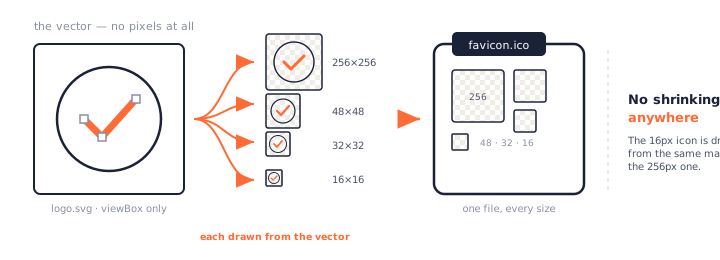
Pick your sizes and click Convert to ICO. Each one is drawn from the vector at that exact size, then bundled into a single icon file. The whole SVG to ICO conversion runs on your own device — no limits, no queue, no account.
Why an SVG Makes the Best Icon Source
An SVG stores shapes and instructions, not pixels. So there is no such thing as converting it "down" to 16×16 — the browser simply draws the shapes at 16 pixels, the same way it would draw them at 256.
Drawn at each size, not shrunk to it
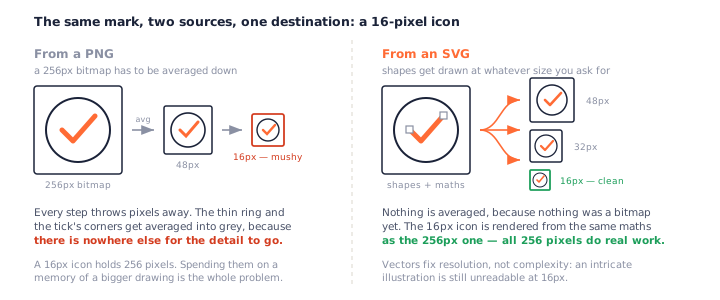
This is the one real advantage SVG to ICO has over any other route to an icon. Start from a PNG and every small size is a compromise: a 256-pixel bitmap gets averaged down to 16, and thin lines turn to grey mush because there is nowhere else for them to go.
Start from a vector and there is no averaging step at all. The 16-pixel icon is rendered from the same maths as the 256-pixel one.
What that buys you at 16×16
Cleaner edges where a shape meets the background, and a better chance that a thin stroke survives as a line rather than a smudge. It is not magic — 16×16 is still only 256 pixels — but converting SVG to ICO spends all of them on the drawing instead of on the memory of a bigger drawing.
When it does not help
If your SVG is mostly one big embedded photo, it is a bitmap wearing a vector's coat, and it shrinks exactly like any other bitmap. Same if the artwork is too intricate: converting SVG to ICO cannot make a detailed illustration readable at 16 pixels. Vectors fix resolution, not complexity.
What Your SVG Loses on the Way to an Icon
This is the part almost every SVG to ICO converter skips, and it is the reason conversions go wrong. An SVG is a document that references the world around it. An icon is a sealed grid of pixels. Some things do not make that crossing — and a plain SVG to ICO conversion will not say a word about it.
Fonts fall back to whatever the machine has
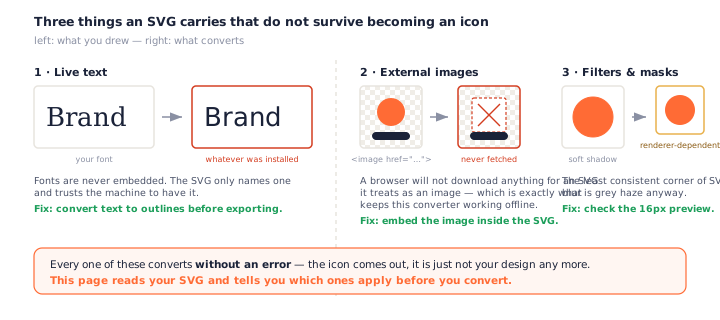
Fonts are never embedded in an SVG. Your file does not contain the letters — it contains a note saying “set this in Bricolage Grotesque”, and trusts whoever opens it to own that font.
During conversion nothing is downloaded, so the renderer substitutes. Your text still appears, which is what makes this so easy to miss: the SVG to ICO conversion reports success, the icon comes out, and it simply is not your logo any more.
Outline your text first
In Inkscape, Path → Object to Path. In Illustrator, Type → Create Outlines. In Figma, Flatten. Your letters become shapes and travel with the file. This page warns you when it finds live text — but only your editor can fix it.
External images silently disappear
If your SVG points at a picture elsewhere on the web, that picture never arrives. A browser will not fetch external files for an SVG it is treating as an image.
That rule is also what keeps this page honest: nothing is requested, so nothing about your file leaks, and the converter works with the network off. The cost is that any part of your artwork living somewhere else is missing. Embed it and it converts fine.
Filters and masks are renderer roulette
Blurs, drop shadows, and masks are the least consistently implemented corner of SVG. Two browsers can render the same filter noticeably differently, and at 16 pixels a soft shadow is mostly a grey haze anyway. No SVG to ICO converter can promise otherwise — check the preview.
Scripts never run — and that is the point
An SVG can technically contain JavaScript, which is a fair thing to worry about when you are dropping a file you did not write onto a web page. When an SVG is loaded as an image, browsers refuse to run any of it. Combined with the no-upload promise, your file is inert here.
An SVG Has No Pixel Size
Ask a browser how big your SVG is and it will answer confidently — and the number will be meaningless.
Why 150×150 is not your SVG's resolution
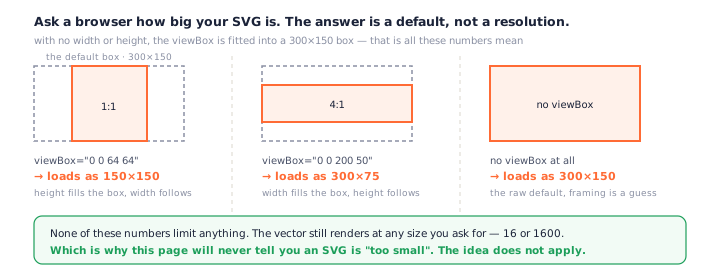
An SVG with no width or height gets fitted into a default 300×150
box. A square viewBox comes back as 150×150, a 4:1 one as 300×75, and a file with no viewBox
at all as 300×150.
None of that limits anything. Those are display defaults, not resolution — the vector still renders at any size you ask for. Which is why this page will never tell you your SVG is “too small” before converting SVG to ICO: the idea does not apply to a format with no pixels.
A non-square viewBox meets a square icon
Icons are square. A wordmark at 4:1 is not, so something has to give — crop it, or keep it all and accept bands of empty space. Because a vector loses nothing to shrinking, keeping the whole thing is the sensible default here, and this page does that. But a 4:1 logo squeezed into a 16-pixel square is four pixels tall. Cropping to the symbol usually beats it.
You Already Have an SVG Favicon — Why Bother With ICO?
Searches for SVG to favicon and SVG to ICO usually come from the same person with the same goal: a logo that shows up in a browser tab. The two are not alternatives.
A fair question, and one every other SVG to ICO converter dodges. If browsers take an SVG favicon now, why convert SVG to ICO at all?
/favicon.ico is the fallback nothing else covers
Declare an SVG favicon in your HTML and a modern browser will use it — it does not go looking
for /favicon.ico as well. So if every visitor arrived on a modern browser, at a
page you control, with your link tags present, you would not need an ICO at all. That is not
what happens.
A browser falls back to /favicon.ico whenever there is no link tag to read. That
covers more of the web than it sounds: PDFs and other files served straight from your domain
carry no <head> at all, older browsers understand nothing but ICO, and
plenty of crawlers and link-preview bots only ever try the root path.
It is a floor, not a headline feature. One small file at your site root and none of those cases fail — which is why SVG to favicon work still ends with an .ico, even in 2026.
What a 2026 favicon set looks like
Doing SVG to favicon properly means shipping a set, not a file. Three covers effectively
everything: favicon.ico at the root for the
automatic request and older browsers, an SVG for modern ones, and a 180×180 PNG for iOS home
screens. So converting SVG to favicon is really three jobs, and the ICO is the floor rather
than the ceiling — it is the one this page makes.
Which ICO Sizes to Generate from a Vector
For favicons
16, 32 and 48. Browsers choose; 16 is the one anyone actually sees, so judge your SVG to ICO result on that preview rather than the big one.
For Windows app icons
Add 256×256 — Explorer's large-icon view uses it, and installers expect it.
Why 256 is nearly free here
From a bitmap source, a 256 entry is only as good as your original file. From a vector it is drawn fresh at full quality regardless, and it is PNG-compressed inside the ICO, so it costs a few kilobytes. There is no reason to leave it out when you convert SVG to ICO.
SVG vs PNG vs ICO: What Each One Is For
| SVG | PNG | ICO | |
|---|---|---|---|
| Stores | Shapes | Pixels | Pixels, several sizes |
| Resolution | Any | Fixed | Fixed per entry |
| Transparency | Full | Full | Full |
| Holds many sizes | No — one drawing, any size | No | Yes |
| Good icon source | Best | Good | — |
| Windows understands it | No | Partly | Yes |
That last row is the point of converting SVG to ICO: Windows and the favicon convention do not read vectors, so the drawing has to be baked into fixed-size pixels somewhere. Better to do it once, from the vector, at every size at once.
Only have a raster file? The PNG to ICO converter handles artwork, and the JPG to ICO converter deals with photos and their white backgrounds. Going the other way, ICO to PNG unpacks an existing icon.
PNGConvert vs Other SVG to ICO Converters
| PNGConvert | Typical converters | |
|---|---|---|
| Conversion happens | In your browser | On their servers |
| Tells you what will break | Before you convert | Never |
| See it at 16px first | Yes, live | No |
| Choose crop or keep whole | Yes | Decided for you |
| Scripts in your SVG | Cannot run | Uploaded to a server |
| Daily limit | None | Common on free tiers |
Converters that never mention what breaks
Every SVG to ICO converter we looked at will happily take an SVG with live text and hand back an icon in a different font, with no warning at either end. One suggests outlining your text, in a single sentence, on a different page. None of them check the file.
Why local matters less here — and still matters
Honestly: an SVG logo is not a holiday photo. There is no GPS in it, and it is often public anyway, so the privacy argument is weaker here than on the JPG page. What local SVG to ICO conversion buys you instead is no queue, no size cap, no daily limit, a tool that works offline — and the guarantee that a script hidden in someone else's SVG never goes anywhere near a server.
Frequently Asked Questions
Is this SVG to ICO converter free?
Yes — no limits, no account, no watermark, and no waiting between downloads. Every SVG to ICO conversion runs on your own device, so there is no server cost to pass on and nothing for us to ration.
Why did my text change font or look wrong?
Because fonts are never embedded in an SVG. The file names a font and trusts the machine to have it, so when your SVG is rendered it uses whatever is available — often a substitute that looks nothing like your design. The fix is in your editor: convert text to outlines (Path → Object to Path in Inkscape, Type → Create Outlines in Illustrator) and the shapes travel with the file. This page warns you when it spots live text.
Will my SVG transparency be preserved?
Yes, completely. SVG and ICO both support full alpha transparency, so converting SVG to ICO gives you an icon with a transparent background — nothing is flattened, and there is no white box to remove the way there is when you convert JPG to ICO.
What size should a favicon ICO be?
Include 16×16, 32×32 and 48×48 — browsers pick whichever fits. Add 256×256 if the same icon might be a Windows app or shortcut icon; it is PNG-compressed inside the ICO, so it costs only a few kilobytes. Those four are pre-selected here, and one SVG to ICO conversion produces all of them inside a single file.
Can I just use the SVG as a favicon instead?
You can, and you should — but not on its own. Modern browsers accept an SVG favicon and will use it instead of looking for /favicon.ico, and it is the crisp choice on high-DPI screens. The gap is everything with no link tag to read: a PDF served from your domain, an older browser that only understands ICO, a crawler that just tries the root path. So an SVG to favicon setup in 2026 means all three files: the SVG for modern browsers, a 180×180 PNG for iOS, and an ICO at the root as the fallback nothing else covers.
Why is part of my SVG missing after converting?
Almost certainly an external reference. If your SVG points at an image somewhere on the web, that file is never downloaded during conversion — the browser refuses to fetch anything for an SVG loaded as an image, which is exactly what keeps this page working offline. The referenced part simply is not there. Embed the image in the SVG and it will convert fine. This page warns you when it finds one.
Can I convert multiple SVG files at once?
Yes, up to 50 at a time. Each file gets its own card, its own health check and its own settings, and Download All saves every icon as one zip. Batch SVG to ICO has no cap beyond those 50 and no daily limit.
Does my SVG get uploaded anywhere?
No. The whole SVG to ICO conversion happens in your browser, so the file never leaves your device and the tool keeps working offline. There is a security bonus too: an SVG can technically contain scripts, but a browser refuses to run them when the SVG is loaded as an image — which is how this page loads yours. See our privacy policy for what that means in practice.
More Free Converter Tools
The SVG to ICO converter is one of a growing family of free, in-browser tools on pngconvert.net — same privacy promise, no accounts, no uploads:
Turn PNG images into multi-size Windows icons and favicons.
JPG to ICOCrop a photo square, drop its background, and get a Windows icon.
WebP to ICOEvery size in one icon — and pick the frame if it is animated.
PNG to CURA Windows cursor with the click point set exactly — test it before you download.
PNG to ICNSA complete macOS icon — all ten Retina sizes, no Mac needed.
ICO to PNGExtract every size from an ICO file as separate PNG images.
WebP to PNGUnpack WebP to a transparent PNG — one frame, every frame, or an APNG.
SVG to PNGRasterize a vector to PNG at any size — 1x, 2x, 3x or a custom width.
AVIF to PNGTurn an AVIF your software won’t open into a PNG that works everywhere.
HEIC to PNGConvert iPhone HEIC photos to PNG in your browser — nothing uploaded.
GIF to PNGOne frame, every frame as a zip, or an animated PNG — you choose.
JPG to PNGLossless PNG from a JPG — and a flat background keyed to transparency.
PNG to WebPShrink PNG to WebP and watch the size drop live — lossy or lossless.
PNG to GIFA GIF encoded in your browser — one still, or several PNGs as one animation.
WebP to GIFAnimated WebP to a GIF that plays anywhere — every frame kept, Safari included.
PNG to JPGConvert PNG to JPG — pick what fills transparent areas, see the size drop.
WebP to JPGConvert WebP to a JPG that opens anywhere — you pick what fills the transparency.
HEIC to JPGConvert iPhone HEIC photos to small, shareable JPGs — nothing uploaded.
AVIF to JPGA JPG that every app and upload form accepts — with the real size change shown.
JFIF to JPGA JFIF is already a JPEG — rename it without losing a byte, or re-encode.
Favicon GeneratorOne logo in, the favicon files you actually need out.