How to Convert GIF to PNG in 3 Steps
Converting GIF to PNG takes seconds, and the tool above does it without uploading anything. The part worth a minute of your attention is what happens to an animated GIF — that is where converters differ most, and where this one gives you a real choice.
- Add your GIF
Drag it in, click to browse, or paste with
Ctrl+V. Static or animated GIF files are both fine — up to 50 at once, no size cap, and nothing is uploaded. - Choose what comes out
A still GIF converts straight to PNG. If it is animated, the GIF to PNG conversion is your call: one frame from the filmstrip, every frame as a zip, or an animated PNG that keeps moving. You decide instead of getting a silent default.
- Download your PNG
Click Convert to PNG and the file downloads. Transparency is preserved, the original GIF plays next to the output so you can compare, and both file sizes are shown.
Why Convert GIF to PNG?
GIF is a 1987 format that refuses to die. It still animates half the internet, but as a still-image format it lost on every axis: a GIF holds at most 256 colours per palette, its transparency is all-or-nothing, and its compression predates the modern web.
PNG is what replaced it, and a GIF to PNG conversion is how you cross over. People convert GIF to PNG to:
- Edit a frame. Design tools would rather receive a PNG, and a frame pulled from an animation makes a thumbnail, a sticker, or a bug report.
- Get dependable transparency. A transparent GIF becomes a transparent PNG that behaves in editors and slide decks.
- Unpack an animation. Every frame as its own PNG is the raw material for sprite sheets, frame-by-frame edits, and video workflows.
- Escape the palette. PNG stores true colour losslessly, so nothing more is quantised away after the conversion.
One caution: if the image is a photo and transparency does not matter, PNG is the wrong destination — a JPG is far smaller for photographic content. GIF to PNG is for graphics, frames, and anything that must stay crisp or transparent.
Animated GIFs: One Frame, Every Frame, or APNG?
This is the question every GIF to PNG converter has to answer and almost none of them ask you. A plain PNG cannot move, so an animated GIF has to become something. Of the converters ranking for this search, one states it takes the first frame; the rest do the same thing silently. Want the other frames? That is a separate "splitter" tool on another page. Want an APNG? A third page.
Here, all three outcomes live on the card you just dropped the file onto:
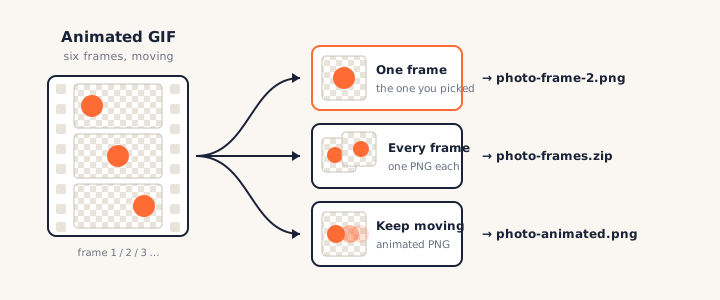
A single frame — the one you chose
The filmstrip shows every frame with its number. Click the one you want; that exact frame becomes your PNG. Frame one is often the worst pick — many GIFs open on an empty canvas or mid-motion blur — which is precisely why converters that grab it silently disappoint.
Every frame, as a zip of PNGs
Choose Every frame and the tool extracts frames from the GIF one by one — each a full PNG, numbered and zero-padded so they sort correctly — then hands you a single zip. This is the frame extraction workflow that normally requires a dedicated splitter site.
Keep it moving, as an animated PNG
The third path converts GIF to animated PNG: every frame and its timing packed into one APNG file that still plays. Same motion, but stored with full colour depth instead of a 256-colour palette — the format upgrade GIF animations have deserved for years. The same three-way choice exists on our WebP to PNG converter, for the same reason.
When your browser can't reach the frames
Enumerating GIF frames needs the browser's ImageDecoder API, which today means
Chrome or Edge. In Firefox, this GIF to PNG converter still detects that a file is animated
and still converts it — you get the first frame, and the page says so plainly instead of
passing an animation off as a still. Very long GIFs are also handled honestly: frames are
decoded up to a memory budget, and the strip tells you if it is showing the first 60 of 300
rather than pretending that is all there is.
GIF vs PNG vs APNG: Format Differences
Converting GIF to PNG copies every pixel of a palette-based, 256-colour format into a lossless format with full colour and 8-bit transparency. No quality is lost in the conversion — but detail the GIF already threw away cannot come back.
That one sentence is most of what you need. The table fills in the rest, including where APNG — the animated flavour of PNG — fits between them.
| Capability | GIF (1987) | PNG (1996) | APNG (2008) |
|---|---|---|---|
| Colours | 256 per palette | 16.7M (24-bit) | 16.7M (24-bit) |
| Transparency | On/off (1-bit) | 256 levels (8-bit alpha) | 256 levels (8-bit alpha) |
| Animation | Yes | No | Yes |
| Compression | Lossy in practice (palette) | Lossless | Lossless |
| Browser support | Universal | Universal | All major browsers since 2017 |
| Typical size | Small-ish | Larger (lossless) | Largest (lossless, animated) |
The practical reading: for a still image, a GIF to PNG conversion is an upgrade on every axis except file size, and often even there. For an animation, APNG beats GIF on quality and transparency at the cost of bytes — and every current browser plays it. The only reason to stay with GIF is compatibility with old software that predates both.
Transparency and Color: What Converts Cleanly
"Gif to png transparent" is one of the most common versions of this search, so here is the straight answer: transparency survives the conversion exactly; it does not get better.
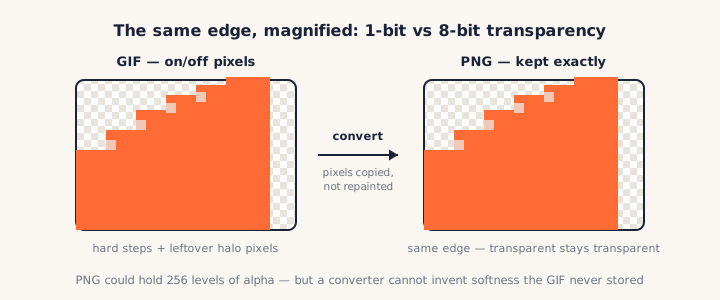
In a GIF, each pixel is either fully opaque or fully transparent — one bit, no in-between. PNG supports 256 levels of partial transparency, which is how it gets those soft, anti-aliased edges. When you convert GIF to PNG, the transparent pixels stay perfectly transparent, but the hard edge is the edge you keep: a converter copies pixels, it does not repaint them.
The same honesty applies to colour. A GIF was quantised down to 256 colours when it was made; converting to PNG stops any further loss but cannot reconstruct the original shades. If a GIF looks banded or dithered, its PNG will too. When the source is a modern format rather than a GIF, the story is different — an AVIF or HEIC usually carries far more colour into the PNG than any GIF can.
Why convert at all, then? Because once the GIF to PNG conversion is done, the image is safe: lossless, editable, and welcome in software that mishandles GIF transparency — and any edge cleanup is a five-minute job in an editor that can do partial alpha.
PNGConvert vs Other GIF to PNG Converters
We checked the tools that rank for gif to png and compared them on the things that matter. Two patterns stand out: most upload your file to a server, and almost none of them tell you what happens to an animation.
| PNGConvert | Convertio | ezgif | OnlinePngTools | |
|---|---|---|---|---|
| Runs locally, no upload | ✓ | ✗ (server) | ✗ (server) | ✓ |
| Animated GIF: your choice | ✓ frame / zip / APNG | ✗ first frame | Split & APNG are separate tools | Pick one frame |
| All frames as zip | ✓ same page | ✗ | ✓ on /split | ✗ |
| Animated PNG out | ✓ same page | ✗ | ✓ on /gif-to-apng | ✗ |
| Free without limits | ✓ | Daily quota | ✓ (200 MB cap) | Daily limit, paid commercial use |
| No account needed | ✓ | For batches | ✓ | ✓ |
The gap this page fills is consolidation: elsewhere, converting a GIF, splitting its frames, and making an APNG are three different tools — sometimes on three different sites. Here it is one card with three buttons, and the file never leaves your machine.
Check the privacy claim yourself
Open your browser's developer tools, watch the Network tab, and convert a GIF to PNG — no request carries your file. Or go offline and try again: it still works. That is the difference between local conversion and an upload with a "we delete it later" promise.
Frequently Asked Questions
Is this GIF to PNG converter really free?
Yes, completely — no signup, no watermark, and no daily cap on GIF to PNG conversions. Some in-browser converters meter free use and charge for commercial work; this one cannot even count your conversions, because they run on your device and never touch our servers.
Do my GIFs get uploaded when I convert them?
No. The whole GIF to PNG conversion happens in your browser, so the file never leaves your device and the tool keeps working offline. You can verify it: open your browser’s Network tab and convert — no upload appears. See our privacy policy.
Does converting GIF to PNG lose the animation?
Only if you ask for a still. A plain PNG holds one image, so an animated GIF must become something — and here you choose: a single frame you picked, every frame as a zip of PNGs, or an animated PNG (APNG) that keeps the motion. Most converters quietly keep frame one and discard the rest.
Which frame of an animated GIF do I get?
Whichever one you click. The filmstrip shows every frame the browser can reach, numbered in order, and the frame you select becomes the PNG. Other tools default to the first frame — often the worst one, since many GIFs start on an empty or mid-motion frame.
Can I extract all frames from a GIF at once?
Yes. Choose Every frame and the GIF to PNG converter turns each frame into its own PNG, numbered and zero-padded so they sort correctly, bundled into a single zip. It is the frame extractor design and sprite workflows want, without a separate tool.
Will transparency be preserved?
Yes — exactly as the GIF stored it. GIF transparency is on/off per pixel (1-bit), and those pixels stay transparent in the PNG. What conversion cannot do is invent the soft 8-bit alpha edges GIF never had, so hard or haloed edges in the original stay that way. See the transparency section above for why.
Is APNG better than GIF?
Technically, yes: an animated PNG stores full 24-bit colour plus 8-bit alpha, against GIF’s 256-colour palette and on/off transparency, and every major browser has played APNG since 2017. The trade-off is file size — true colour usually costs more bytes — and a few older apps still treat an APNG as a still PNG.
How do I convert PNG back to GIF?
Usually you shouldn’t — going back to GIF costs you colour depth and real transparency. If you are trying to make a still PNG smaller for the web, the PNG to WebP converter shrinks it without dropping to a 256-colour palette. A PNG-to-GIF animation builder may join this site later.
More Free Converter Tools
This GIF to PNG converter is part of a family of free, in-browser tools on pngconvert.net — same privacy promise, no accounts, no uploads:
Turn PNG images into multi-size Windows icons and favicons.
JPG to ICOCrop a photo square, drop its background, and get a Windows icon.
SVG to ICODraw a vector at every icon size, and see what it loses first.
WebP to ICOEvery size in one icon — and pick the frame if it is animated.
PNG to CURA Windows cursor with the click point set exactly — test it before you download.
PNG to ICNSA complete macOS icon — all ten Retina sizes, no Mac needed.
ICO to PNGExtract every size from an ICO file as separate PNG images.
WebP to PNGUnpack WebP to a transparent PNG — one frame, every frame, or an APNG.
SVG to PNGRasterize a vector to PNG at any size — 1x, 2x, 3x or a custom width.
AVIF to PNGTurn an AVIF your software won’t open into a PNG that works everywhere.
HEIC to PNGConvert iPhone HEIC photos to PNG in your browser — nothing uploaded.
JPG to PNGLossless PNG from a JPG — and a flat background keyed to transparency.
PNG to WebPShrink PNG to WebP and watch the size drop live — lossy or lossless.
PNG to GIFA GIF encoded in your browser — one still, or several PNGs as one animation.
WebP to GIFAnimated WebP to a GIF that plays anywhere — every frame kept, Safari included.
PNG to JPGConvert PNG to JPG — pick what fills transparent areas, see the size drop.
WebP to JPGConvert WebP to a JPG that opens anywhere — you pick what fills the transparency.
HEIC to JPGConvert iPhone HEIC photos to small, shareable JPGs — nothing uploaded.
AVIF to JPGA JPG that every app and upload form accepts — with the real size change shown.
JFIF to JPGA JFIF is already a JPEG — rename it without losing a byte, or re-encode.
Favicon GeneratorOne logo in, the favicon files you actually need out.