How to Convert JPG to PNG in 3 Steps
The conversion itself is a one-click job. What deserves your attention is the background — the thing most people converting JPG to PNG actually care about, and the thing most converters refuse to discuss. The steps below include it.
- Add your JPG — up to 50
Drag them in, click to browse, or paste with
Ctrl+V. Nothing uploads: the whole JPG to PNG conversion runs on your device, so it works offline and there is no file-size ceiling waiting for you. - Decide about the background
A PNG will keep the JPG’s background exactly — JPG has no transparency to convert. If the background is a flat colour, tick Make the background transparent, click the background in the preview to pick its colour, and watch it disappear on the checkerboard.
- Convert and download
Click Convert to PNG and compare sizes — the PNG is usually larger because it is lossless. Batch converting? Download All bundles every PNG into one zip.
Will My PNG Be Transparent? The Honest Answer
No — converting JPG to PNG does not create transparency. A JPG stores only red, green and blue; there is no alpha channel in the file, so the PNG that comes out keeps the exact same solid background the JPG had.
This is the most common misconception on this keyword, and most tools let you find out after downloading. PNG is a format that can hold transparency; a JPG to PNG conversion has none to give it. The white stays white.
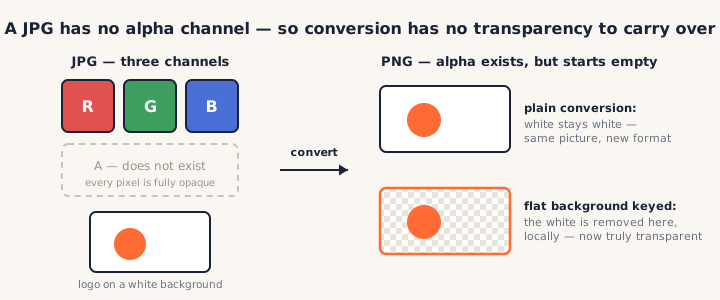
The case this page can actually solve
Most "I need a transparent PNG from this JPG" jobs are a logo on white, a product shot on a seamless backdrop, a scan. That is not a segmentation problem — it is one flat colour, and a colour key removes it cleanly:
- Tick Make the background transparent on the card.
- Click the background in the preview — the exact colour under your cursor becomes the key.
- Adjust tolerance until the checkerboard shows through, with a soft feathered edge instead of a hard cut.
The same keying engine drives our JPG to ICO converter, and it all runs locally — the photo is never uploaded to be processed.
And the case it will not pretend to solve
Hair against a busy street, soft shadows, gradients — a colour key cannot cut those, and a tolerance slider pushed far enough just eats the subject. That job belongs to an AI background remover, which is a different tool with a different trade-off (your photo gets uploaded and processed on a server). We would rather tell you that than sell you a slider.
Why Convert JPG to PNG?
Aside from the transparency workflow above, three reasons keep this conversion useful:
- Stopping generational loss. Every time a JPG is edited and re-saved as JPG, it is compressed again and degrades again. Convert JPG to PNG once, and the image is lossless from that point on — edit and save as often as you like.
- A platform demands PNG. Upload forms, app stores, print pipelines and
CMSes regularly refuse
.jpg. The conversion is the whole task; this page does 50 at a time into one zip. - Preparing to edit. Screenshots, diagrams and UI images survive editing far better as PNG — no compression artifacts creeping around text and hard edges.
What conversion cannot do is repair JPG artifacts that already exist. PNG keeps exactly the pixels it is given — including the blocky ones. No converter can do better than that, and the ones that claim to are selling upscalers.
JPG vs PNG: What Actually Changes
| Capability | JPG | PNG |
|---|---|---|
| Compression | Lossy — detail discarded every save | Lossless — pixels kept exactly |
| Transparency | None | Full 8-bit alpha |
| Best for | Photos to share or ship | Editing, graphics, text, transparency |
| File size | Small | Larger — the cost of lossless |
The rule of thumb: JPG is how a finished photo travels; PNG is how a working image lives. Converting JPG to PNG moves an image from the travel format to the working format — and the size line on each card shows what that costs in bytes.
PNGConvert vs Other JPG to PNG Converters
We checked what ranks for jpg to png. Most of it uploads your photo to a server; on the transparency question, almost everyone is silent — and nobody pairs the honest answer with a built-in fix.
| PNGConvert | CloudConvert | Convertio | FreeConvert | jpg2png.com | |
|---|---|---|---|---|---|
| Runs locally, no upload | ✓ | ✗ | ✗ | ✗ | ✓ |
| Honest about transparency | ✓ | ✗ (silent) | ✗ (silent) | ✗ (silent) | ✓ (but no fix) |
| Flat-background keying built in | ✓ click to pick | ✗ | ✗ | ✗ | ✗ |
| Free without account | ✓ (50 files) | Quota + account | Premium for more | Signup over 1 GB | ✓ (20 files) |
Check the privacy claim yourself
Open your browser's developer tools, watch the Network tab, and convert a JPG to PNG — no request carries your photo. Turn off your connection and it still works. A local converter does not need a deletion policy.
Frequently Asked Questions
Is this JPG to PNG converter really free?
Yes — no signup, no watermark, no daily limit, and the background keying is not a paid extra. Conversions run in your browser, so there is nothing for us to meter and no server bill to recover.
Do my photos get uploaded?
No. Every JPG to PNG conversion happens locally in your browser — the photo never leaves your device, and the tool keeps working with your connection off. Most ranking converters upload your file and promise to delete it later; ours never receives it. See our privacy policy.
Will the PNG have a transparent background?
Not by itself. A JPG has no alpha channel, so there is no transparency for any converter to carry over — the PNG keeps the same solid background. What this tool adds is the fix for the common case: if the background is one flat colour, enable background removal and it is keyed to real transparency, locally.
Why is my PNG not transparent after converting from JPG?
Because the transparency was never in the file. PNG supports transparency; converting into PNG does not create it. The pixels that were white in the JPG are still white in the PNG — just now in a format that could hold transparency if you removed them. That removal is the extra step, and for flat backgrounds this page does it.
Does converting JPG to PNG improve quality?
No — and be wary of tools that imply it does. JPG compression already discarded detail; PNG faithfully stores what is left and guarantees nothing more is lost through future edits and saves. That is the real benefit: it stops the bleeding, it does not heal the wound.
Why is the PNG so much bigger than my JPG?
JPG is aggressively lossy; PNG is lossless. Storing the same pixels without loss simply costs more bytes — often several times more for photos. If you need a small file rather than an editable one, going the other way with PNG to JPG or PNG to WebP is the right move.
What happens to complex backgrounds — hair, shadows, gradients?
Honestly: a colour-based key cannot cut those cleanly, and we do not pretend otherwise. The keying here is built for flat, single-colour backgrounds — product shots, scans, logos. For busy backgrounds you want an AI segmentation tool; that is a different job than a JPG to PNG converter should fake.
How do I convert PNG back to JPG?
With the mirror tool: the PNG to JPG converter. It runs locally the same way, lets you pick what fills transparent areas, and shows the size drop live as you adjust quality.
More Free Converter Tools
This JPG to PNG converter is part of a family of free, in-browser tools on pngconvert.net — same privacy promise, no accounts, no uploads:
Turn PNG images into multi-size Windows icons and favicons.
JPG to ICOCrop a photo square, drop its background, and get a Windows icon.
SVG to ICODraw a vector at every icon size, and see what it loses first.
WebP to ICOEvery size in one icon — and pick the frame if it is animated.
PNG to CURA Windows cursor with the click point set exactly — test it before you download.
PNG to ICNSA complete macOS icon — all ten Retina sizes, no Mac needed.
ICO to PNGExtract every size from an ICO file as separate PNG images.
WebP to PNGUnpack WebP to a transparent PNG — one frame, every frame, or an APNG.
SVG to PNGRasterize a vector to PNG at any size — 1x, 2x, 3x or a custom width.
AVIF to PNGTurn an AVIF your software won’t open into a PNG that works everywhere.
HEIC to PNGConvert iPhone HEIC photos to PNG in your browser — nothing uploaded.
GIF to PNGOne frame, every frame as a zip, or an animated PNG — you choose.
PNG to WebPShrink PNG to WebP and watch the size drop live — lossy or lossless.
PNG to GIFA GIF encoded in your browser — one still, or several PNGs as one animation.
WebP to GIFAnimated WebP to a GIF that plays anywhere — every frame kept, Safari included.
PNG to JPGConvert PNG to JPG — pick what fills transparent areas, see the size drop.
WebP to JPGConvert WebP to a JPG that opens anywhere — you pick what fills the transparency.
HEIC to JPGConvert iPhone HEIC photos to small, shareable JPGs — nothing uploaded.
AVIF to JPGA JPG that every app and upload form accepts — with the real size change shown.
JFIF to JPGA JFIF is already a JPEG — rename it without losing a byte, or re-encode.
Favicon GeneratorOne logo in, the favicon files you actually need out.