Select
Selection changed — click Re-extract.
See every size hiding inside your icon, pick the ones you want, and convert ICO to PNG right in your browser — no upload, no signup, no limits.
Click to browse or drag and drop
.ico and .cur files — no size limit, up to 50 files at once
You can also paste an icon with Ctrl+V
Selection changed — click Re-extract.
Converting ICO to PNG with this tool takes seconds, and nothing is sent over the internet — the whole job happens on your own device.
Drag and drop one or more .ico files into the box above, click to browse, or paste one from your clipboard with Ctrl+V. Cursor files (.cur) work too. The moment a file lands, every image inside it appears as a thumbnail — before you convert anything.
Click any thumbnail to include or exclude it. Everything is selected by default, or use a preset: All, Largest only, or Favicon set for the 16, 32 and 48 pixel images. The counter tells you exactly how many PNG files you are about to get.
Click Convert to PNG, then grab images one at a time or take all of them as a zip. The whole ICO to PNG conversion runs on your own device, so there is no queue, no waiting, and no daily cap.
This is the question every other ICO to PNG converter leaves you to discover by accident. You
drop in one file called favicon.ico and suddenly four downloads appear. Nothing
went wrong — that is simply what was always inside.
An ICO file is a container, not a single picture. It holds several complete images of the same artwork at different resolutions. Converting ICO to PNG means unpacking that container, and each image inside becomes its own PNG file.
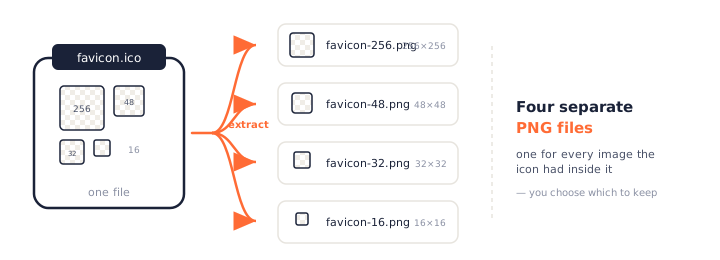
Most website icons carry 16×16, 32×32 and often 48×48. Convert that ICO to PNG and you get three images. They are not duplicates — each one was drawn or tuned separately, which is the entire reason the format exists.
Desktop software ships fatter icons: 16, 24, 32, 48, 64, 128 and 256 pixels are all common, and a single ICO can legally hold up to 256 images. Extracting one of those gives you a stack of PNG files covering every size Windows might ask for.
Sometimes there really is just one picture inside, and converting that ICO to PNG gives you a single file. This tool says so up front — the card reads “contains only one 32×32 image” rather than leaving you to wonder whether something failed.
An ICO file is a Microsoft icon container that stores the same artwork at several resolutions in one file, so Windows and browsers can pick the sharpest version for whatever they are drawing.
PNG works the opposite way: one file, one image, one resolution. That difference is the whole reason converting ICO to PNG produces more files than you started with.
An ICO opens with a small directory that lists what is inside — how many images there are, how big each one is, and where its bytes begin. Reading that directory takes microseconds, which is why the thumbnails on this page appear the instant you drop a file in, before any pixel is decoded.
Here is the part almost no ICO to PNG converter mentions, even though it decides whether your transparency survives.
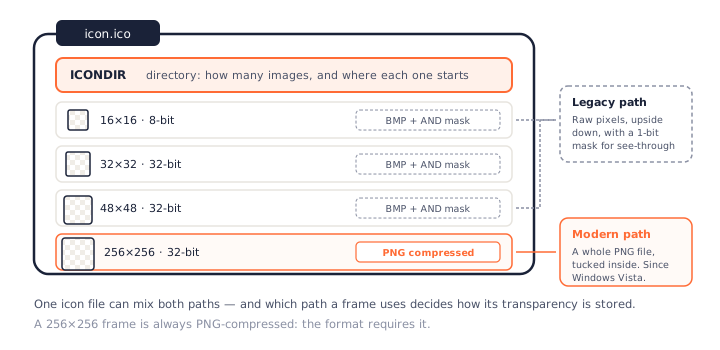
Newer icons tuck an entire PNG file inside the container. The format requires this for 256×256, which is why big modern icons stay small. When you extract one of these, this tool hands back those exact bytes — a lossless copy, with no re-encoding at all.
Older frames store raw pixels bottom-up, followed by a separate one-bit mask that marks which pixels are see-through. Every frame in a typical older favicon uses this path. It is not a rare edge case: check the favicons of long-established sites and you will find BMP frames almost every time — which is precisely why an ICO to PNG converter has to handle both paths properly rather than assuming every frame is a tidy modern PNG.
The ICO format only really matters to Windows and to browser tabs. Everywhere else expects a PNG — which is why people convert ICO to PNG far more often than you might guess.
A shipped favicon.ico is often the last surviving copy of a logo whose source
file vanished years ago. Extracting the 256×256 image gets you back something you can actually
open in Figma or Photoshop.
PNG is the format every design tool, framework, and platform accepts. Modern web icons are PNGs referenced from a manifest; mobile apps, Slack emoji, and README badges all want PNG too. Converting ICO to PNG is the bridge.
Dropping an .ico into a document, a deck, or a design file usually fails outright
— most software cannot read the format at all. A PNG just works.
Once you convert ICO to PNG you have a small pile of images. Here is how to tell them apart.
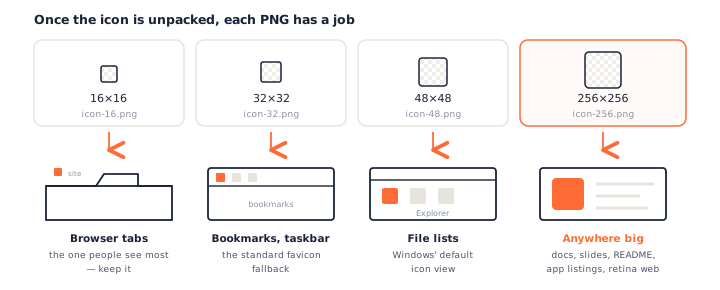
Keep 16×16 and 32×32. Those are the two sizes browsers actually reach for, and 48×48 is worth having if you plan to reference PNG icons from a web manifest.
Take the 256×256. It is the one that looks right in documentation, on a store listing, or anywhere on a high-DPI screen — and it is usually the sharpest image in the file.
A 16-pixel image contains 256 pixels in total. Blowing it up to 256×256 cannot invent the detail that was never captured, and no ICO to PNG converter can change that. If the icon has a large frame, use it; if it does not, go back to the original artwork.
Every ICO to PNG converter claims transparency is preserved. None of them explain what that actually means — or why an old icon sometimes comes out with an ugly pale outline.
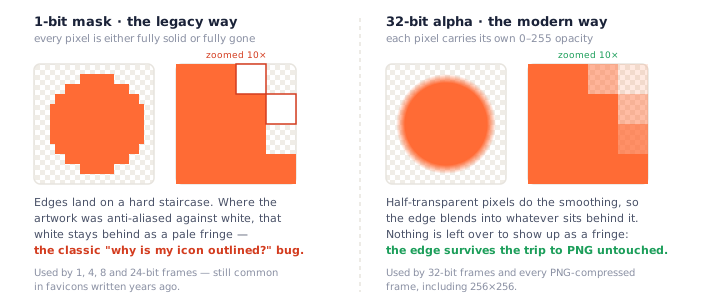
Each pixel carries its own opacity, from fully solid to fully invisible, with every shade in between. PNG stores transparency exactly the same way, so these images transfer across perfectly. Nothing is lost, nothing is approximated.
Older frames get a separate mask where each pixel is a single bit: visible or gone. There is no in-between, so smooth edges cannot be represented at all.
When the artwork was originally anti-aliased against a white background, those blended edge pixels are still white — and a 1-bit mask has no way to fade them out. Convert that ICO to PNG and the white stays, ringing your logo with a pale halo. It is not a bug in the converter; it is information the icon never had. The fix is to go back to the source artwork, or use a larger 32-bit frame from the same file if one exists.
Every frame is read on its own terms: alpha channel where there is one, mask where there is not. There is also a trap we handle quietly — some 32-bit icons ship with an alpha channel that is entirely blank. Taken at face value the whole image would be invisible, so we detect that and fall back to the mask.
Plenty of sites convert ICO to PNG. The interesting difference is what they do with the other images inside your file.
| PNGConvert | Typical cloud converters | Other in-browser tools | |
|---|---|---|---|
| Conversion happens | In your browser | On their servers | In your browser |
| Files uploaded | Never | Yes — some keep output for 24 hours | No |
| Extracts every size | Yes | Often only the largest | Varies |
| Choose sizes visually | Click the thumbnails | No | By typing frame numbers |
| Shows what is inside first | Yes | No | No |
| Daily limit | None | Free-tier caps | Often capped, with wait timers |
| Zip download | Yes, foldered per file | Sometimes | Often missing |
Several well-known services extract the biggest image and quietly throw the rest away — some even present it as a feature. If you wanted the 16×16 for a tab, it is simply gone. That behaviour is a preset here, not a limitation: click Largest only.
The opposite camp extracts everything automatically with no way to opt out. Convert a six-frame icon and you get six files to sort through. That behaviour is our default — but you can deselect anything you do not want before downloading.
Some in-browser converters still cap your usage and make you wait between downloads, which is an odd thing to do when your own CPU did the work. Server-based services at least have a real reason: every conversion costs them money. We have neither the cost nor the cap. If your browser can open the file, it can convert ICO to PNG, as many times as you like.
PNG is a single image with lossless compression and full alpha transparency — the format design tools export and the web understands. ICO is a Microsoft container that bundles several images of the same artwork so an operating system can choose between them.
A useful way to hold it: ICO is the delivery box, PNG is what is inside. Converting ICO to PNG opens the box; the PNG to ICO converter packs a new one.
This also explains why renaming icon.ico to icon.png never works. The
bytes are still an icon container, and no image viewer will accept them. A real conversion has
to read the directory, decode the frame, and write a genuine PNG.
Windows is where most icon files come from, and it is oddly bad at getting images back out.
Paint will happily display an icon, so it looks like the job is done. But Paint sees only one image from inside the container, has no idea the others exist, and flattens transparency to white when saving. You end up with one PNG, wrong background, and no way to reach the sizes you actually wanted.
System icons live inside DLL and EXE files rather than as loose .ico files —
shell32.dll alone holds hundreds. That is why searching your drive for icon files
turns up almost nothing.
To pull an icon out of a program file you need a resource extractor, which saves it as
.ico. From there this page finishes the job: drop the file in and convert ICO to
PNG with every embedded size intact.
Going the other way — turning a photo into an icon and applying it to a shortcut — is a different job with its own pitfalls. We tested five ways to do it in How to Convert JPG to ICO on Windows 11 and 10, including why custom icons revert and how to rebuild the icon cache.
Yes — genuinely free, with no daily limit, no forced wait between downloads, and no account. Some in-browser tools still ration conversions even though your own device does the work; since we never pay for a server to process your file, there is nothing for us to ration. No watermarks either.
One for every image inside the icon that you keep selected. A typical favicon holds two to four images (usually 16×16, 32×32 and 48×48), so you get two to four PNG files. A Windows application icon often holds six or more, including a 256×256. This tool shows you the exact count before you convert, and you decide which ones to keep.
No. The conversion from ICO to PNG happens entirely inside your browser, so your icons never leave your device — and the tool keeps working offline. That matters here more than on most converters: icon files are usually company logos and brand assets. Read our privacy policy for the details.
Yes, and how depends on the image. Modern 32-bit images carry a real alpha channel that transfers to PNG untouched. Older 1, 4, 8 and 24-bit images instead pair the picture with a separate 1-bit mask, which we read and apply for you. We also handle the common case of a 32-bit image whose alpha channel is entirely blank — read literally it would be invisible, so the mask is used instead.
Yes, by clicking the thumbnails. Most converters decide for you: some hand back only the largest image and discard the rest, others dump every image on you whether you wanted them or not. Both behaviours are available here as one-click presets — Largest only and All — but the choice stays yours.
Yes, up to 50 at a time, with no file size limit. Each icon gets its own card and its own selection. Use Download All and the zip keeps each source file in its own folder, so extracting five icons at four sizes gives you twenty PNGs already sorted rather than one flat heap.
Windows has no built-in way to save an ICO as a PNG. Paint will open an icon, but it only ever sees one image inside and saves that single picture with transparency flattened. A browser tool like this one is the fastest route, and it is the only method that gives you every embedded size at once. It works the same on Windows 10, Windows 11, macOS, and Linux.
You need the reverse tool: our free PNG to ICO converter, which packs one PNG into a multi-size icon file. It runs in your browser too, with the same no-upload promise.
The ICO to PNG converter is part of a growing family of free, in-browser tools on pngconvert.net — same privacy promise, no accounts, no uploads:
Turn PNG images into multi-size Windows icons and favicons.
JPG to ICOCrop a photo square, drop its background, and get a Windows icon.
SVG to ICODraw a vector at every icon size, and see what it loses first.
WebP to ICOEvery size in one icon — and pick the frame if it is animated.
PNG to CURA Windows cursor with the click point set exactly — test it before you download.
PNG to ICNSA complete macOS icon — all ten Retina sizes, no Mac needed.
WebP to PNGUnpack WebP to a transparent PNG — one frame, every frame, or an APNG.
SVG to PNGRasterize a vector to PNG at any size — 1x, 2x, 3x or a custom width.
AVIF to PNGTurn an AVIF your software won’t open into a PNG that works everywhere.
HEIC to PNGConvert iPhone HEIC photos to PNG in your browser — nothing uploaded.
GIF to PNGOne frame, every frame as a zip, or an animated PNG — you choose.
JPG to PNGLossless PNG from a JPG — and a flat background keyed to transparency.
PNG to WebPShrink PNG to WebP and watch the size drop live — lossy or lossless.
PNG to GIFA GIF encoded in your browser — one still, or several PNGs as one animation.
WebP to GIFAnimated WebP to a GIF that plays anywhere — every frame kept, Safari included.
PNG to JPGConvert PNG to JPG — pick what fills transparent areas, see the size drop.
WebP to JPGConvert WebP to a JPG that opens anywhere — you pick what fills the transparency.
HEIC to JPGConvert iPhone HEIC photos to small, shareable JPGs — nothing uploaded.
AVIF to JPGA JPG that every app and upload form accepts — with the real size change shown.
JFIF to JPGA JFIF is already a JPEG — rename it without losing a byte, or re-encode.
Favicon GeneratorOne logo in, the favicon files you actually need out.