How to Generate a Favicon in 3 Steps
The hard part of a favicon was never making the image. It is knowing which files to make, and every favicon generator answers that by handing you twenty and wishing you luck.
This one answers it by handing you the files that still do a job in 2026, with a note beside each one saying who it serves. That is the whole difference. The rendering is easy; deciding what to leave out is the part that takes research, and it should not be your research.
- Drop in your logo
SVG is best — it draws cleanly at every size. PNG, JPG and WebP work too. Nothing is uploaded, and this favicon generator keeps working with the network off.
- Check the tab preview
Your icon appears in a mock browser tab at 16 pixels, on a mock iOS home screen at 180, and at actual pixel size beside them. If it is unreadable there, it will be unreadable in production — no favicon generator can fix that after the fact.
- Download and paste four lines
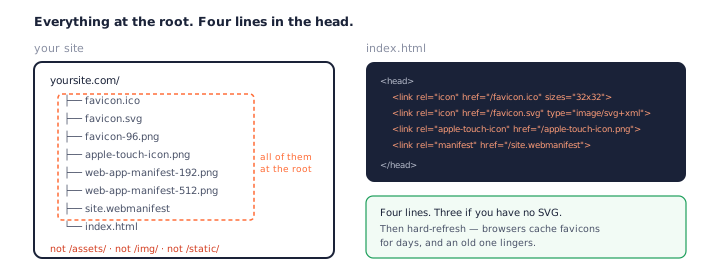
Click Generate favicon, take the zip, and drop every file at the root of your site. The README carries the four lines of HTML you paste into
<head>, and a note on what each file is for.
What Files You Actually Need in 2026
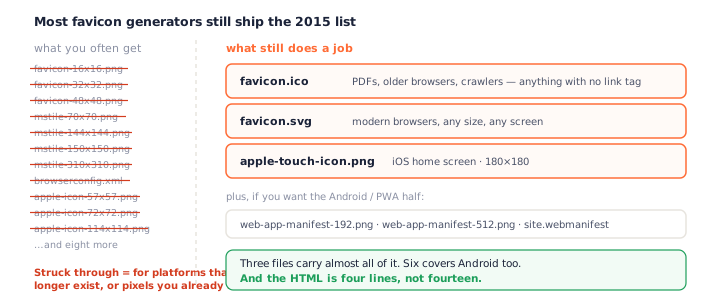
Three files carry almost all of it: an ICO at your site root, an SVG for modern browsers, and a 180×180 PNG for iOS. Add two Android manifest icons and a manifest file and you are done.
The three that matter
favicon.ico is the floor — the thing that answers when nothing else can.
favicon.svg is what a modern browser will actually use, at any size, on any
screen. apple-touch-icon.png at 180×180 is what iOS puts on a home screen, and
Android borrows it when there is no manifest.
Add site.webmanifest and two PNGs at 192 and 512 if you care about Android home
screens or want the site installable, and that is the entire modern set. Six files, where a
2015-era favicon generator would give you twenty-two and let you work out the difference.
The 96-pixel PNG in the package is the one genuinely optional extra: Google renders search result icons from a 48-pixel box and takes the 2× version when it can find one.
The ones you can skip
This is where a favicon generator earns its keep or wastes your afternoon. Every file below is still generated by tools you can use today.
browserconfig.xml and the Windows tiles
Those mstile images existed for pinned tiles on the Windows 8 and 10 start screens. That feature is gone. A favicon generator still emits them because nobody removed the code, not because your site needs them.
The dozen loose PNG sizes
A favicon generator that gives you favicon-16.png, favicon-32.png
and favicon-48.png is handing you pixels that are already inside
favicon.ico. Same image, second copy, more lines of HTML.
Is favicon.ico Still Needed?
It is the question worth getting right, because the answer changed and most favicon generator pages did not.
What modern browsers actually do
They read your link tags. Declare an SVG favicon and a current browser uses it — it does not also fetch the ICO to be safe. If every visitor arrived on a modern browser, at a page you control, with your tags in place, the ICO would never be touched.
This is the bit that changed, and it is why so much favicon advice reads as out of date. For years the honest instruction was "put favicon.ico at the root and stop thinking". Now the root file is the last resort rather than the first stop.
Where the root path still gets tried
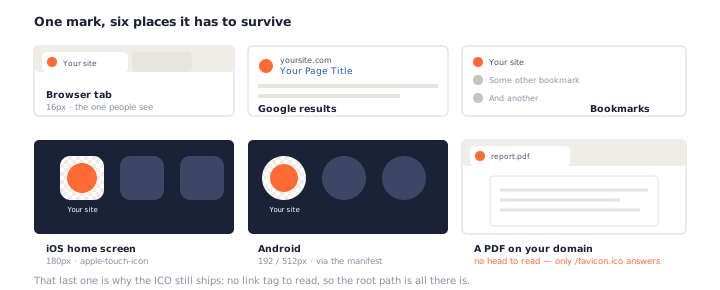
Except plenty of requests have no tags to read. A PDF served from your own domain has no
<head> at all — the browser shows a tab for it and looks for
/favicon.ico. Older browsers understand nothing else. Crawlers and link-preview
bots routinely just try the root path and take what they find.
Why we ship it anyway — as a floor
One small file, a few kilobytes, and none of those cases fail. That is the honest case for it: not the headline, just the floor nothing else covers. Every favicon generator here — ours included — should be judged on whether it tells you that plainly.
What This Favicon Generator Does Not Do
Worth saying plainly, because the alternative is you finding out after you have spent your time here. Every favicon generator has a boundary somewhere; most just do not mention where.
No platform previews
This favicon generator shows you a browser tab and an iOS home screen, and that is it. If you need to see exactly how Android will mask your icon or how iOS rounds the corners on each device, RealFaviconGenerator does that properly and has for years. We are not going to do a worse version of it and call it a feature.
No Safari pinned tab icon from a bitmap
That file has to be a monochrome vector. Producing one means deciding which parts of your logo to flatten into a single colour and which to drop — a design decision, not a conversion. Get it wrong and you ship a smudge. If you need one, it is a minute in your vector editor.
No favicon checker
Checking a live site's favicon means fetching that site, which means a server, which is the one thing this favicon generator does not have. Nothing here leaves your browser, and that is worth more to us than the feature.
Installing Your Favicon: Four Lines
Where the files go
Everything at the root. Not in /assets/, not in /img/ — the root.
Anything that skips your HTML only ever tries /favicon.ico, and it will not go
hunting through your folders.
On most static hosts that means dropping the files in public/ or static/
and letting the build copy them across. On a framework that fingerprints asset names, keep
these out of that pipeline — a favicon called favicon.a3f9c2.ico is a favicon
nothing can find.
The link tags themselves go in <head> on every page, which in practice
means your layout template, not one page.
Why the browser caches it forever
Favicons are cached aggressively, and an old one can survive for days after you replace it. This catches people out constantly and gets blamed on the favicon generator every time. Hard-refresh while testing, and do not panic when a colleague still sees the old mark — they will get there.
Favicon Mistakes That Survive Into Production
These are the ones that get shipped, not the ones that get caught — and none of them are the favicon generator's fault, which is exactly why they survive. Each looks fine on the machine of the person who made it.
A logo that is unreadable at 16px
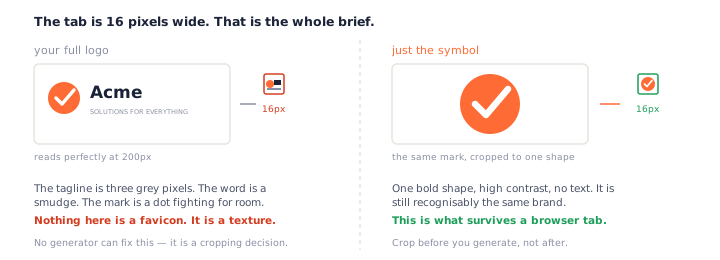
The most common one, and the reason the tab preview above sits where it does. Your wordmark has a tagline. At 16 pixels the tagline is three grey pixels, the word is a smudge, and the symbol is fighting them both for room. Crop to the symbol before you run any favicon generator — no amount of rendering fixes a composition problem.
A white box on a dark tab
No favicon generator can guess this one for you. A logo exported as JPG carries its white background into the icon, and dark browser themes put a bright rectangle in your tab. Start from a PNG or SVG with real transparency — or use the JPG to ICO converter, which can drop a solid background as it converts.
Forgetting the root path
The files land in a build folder, the link tags point at them correctly, everything looks
right — and then a PDF on the same domain shows a blank tab, because nothing put
favicon.ico at the root.
Testing once, on your own machine
A favicon is cached hard. You replace it, you reload, you see the old one, you assume the generator failed and start over. It did not — the browser simply has not let go yet. Hard refresh, or open a private window, before you conclude anything.
A mark that only works on light
Dark browser themes are the default for a lot of people now. A navy monogram that looks sharp on your white mockup disappears entirely into a dark tab strip. Check both — the tab preview on this page follows your own theme, so switching your OS to dark mode shows you the truth.
Frequently Asked Questions
Is this favicon generator free?
Yes — no account, no watermark, no daily limit. This favicon generator runs entirely in your browser, so there is no server bill behind it and nothing for us to ration.
Do I really need 20 favicon files?
No, and you have not for years. A lot of that list exists for platforms that are gone: browserconfig.xml and the mstile images were for pinned tiles on the Windows 8 and 10 start screens. Separate 16, 32 and 48 pixel PNGs duplicate what is already inside favicon.ico. This favicon generator ships seven or eight files, each one still doing a job.
Is favicon.ico still necessary in 2026?
Yes, as a floor rather than a headline. If your page declares an SVG favicon in a link tag, a modern browser uses that and does not go looking for the ICO. But plenty of requests have no link tag to read: a PDF served from your domain, an older browser, a crawler that only tries the root path. One small file at your site root covers all of them.
What size should my source image be?
An SVG has no size and needs none — it draws at whatever size is asked for, which is why it is the best thing to feed any favicon generator. For a raster source, 512×512 or larger, square, with a bit of margin around the mark. Anything smaller and the 512 icon Android wants is an upscale.
Why is there no Safari pinned tab icon?
Because it has to be a monochrome vector, and we cannot invent one from your image. Turning a logo into a single-colour silhouette means deciding which parts to drop, and guessing that badly is worse than not shipping the file. If you need one, make it in your vector editor — it is one path, one colour.
Can I use a photo as a favicon?
You can, but crop it to one bold subject first — a photo at 16 pixels turns to texture. Our JPG to ICO converter handles the cropping and the white background that photos always bring with them.
Where do the files go on my server?
All of them at the root, so they end up at yoursite.com/favicon.ico, yoursite.com/apple-touch-icon.png and so on — whatever favicon generator made them. The root matters: anything without a link tag to read only ever tries the root path. Then hard-refresh — browsers cache favicons for a long time.
Does my logo get uploaded?
No. Your file never leaves your device — this favicon generator does the rendering, the packaging and the zip in your browser. See our privacy policy.
More Free Converter Tools
This favicon generator is one of a family of free, in-browser tools on pngconvert.net — same privacy promise, no accounts, no uploads:
Turn PNG images into multi-size Windows icons and favicons.
JPG to ICOCrop a photo square, drop its background, and get a Windows icon.
SVG to ICODraw a vector at every icon size, and see what it loses first.
WebP to ICOEvery size in one icon — and pick the frame if it is animated.
PNG to CURA Windows cursor with the click point set exactly — test it before you download.
PNG to ICNSA complete macOS icon — all ten Retina sizes, no Mac needed.
ICO to PNGExtract every size from an ICO file as separate PNG images.
WebP to PNGUnpack WebP to a transparent PNG — one frame, every frame, or an APNG.
SVG to PNGRasterize a vector to PNG at any size — 1x, 2x, 3x or a custom width.
AVIF to PNGTurn an AVIF your software won’t open into a PNG that works everywhere.
HEIC to PNGConvert iPhone HEIC photos to PNG in your browser — nothing uploaded.
GIF to PNGOne frame, every frame as a zip, or an animated PNG — you choose.
JPG to PNGLossless PNG from a JPG — and a flat background keyed to transparency.
PNG to WebPShrink PNG to WebP and watch the size drop live — lossy or lossless.
PNG to GIFA GIF encoded in your browser — one still, or several PNGs as one animation.
WebP to GIFAnimated WebP to a GIF that plays anywhere — every frame kept, Safari included.
PNG to JPGConvert PNG to JPG — pick what fills transparent areas, see the size drop.
WebP to JPGConvert WebP to a JPG that opens anywhere — you pick what fills the transparency.
HEIC to JPGConvert iPhone HEIC photos to small, shareable JPGs — nothing uploaded.
AVIF to JPGA JPG that every app and upload form accepts — with the real size change shown.
JFIF to JPGA JFIF is already a JPEG — rename it without losing a byte, or re-encode.