How to Convert HEIC to JPG in 3 Steps
Converting HEIC to JPG is simple, and the tool above does it without uploading anything. Nearly everyone arrives with the same problem — an iPhone photo a computer or website will not open — so the steps are short. (HEIC to JPG and HEIC to JPEG are the same thing; JPG and JPEG are two spellings of one format.)
- Add your HEIC photos
Drag them in, click to browse, or paste with
Ctrl+V. Add up to 50 at once. These are your private iPhone photos, so nothing is uploaded — the conversion happens on your device. - Set the quality
Each photo decodes and then encodes to JPG. Move the quality slider and the file size updates live, so you can find a small file that still looks perfect. 85 is a good starting point.
- Download your JPG
Click Download JPG and it saves a small file that opens on Windows and everywhere else. A batch downloads as one zip.
Why Won't Windows Open My HEIC Photos?
This is the question behind nearly every HEIC to JPG search, and the cause is simple.
HEIC needs a codec Windows doesn't ship
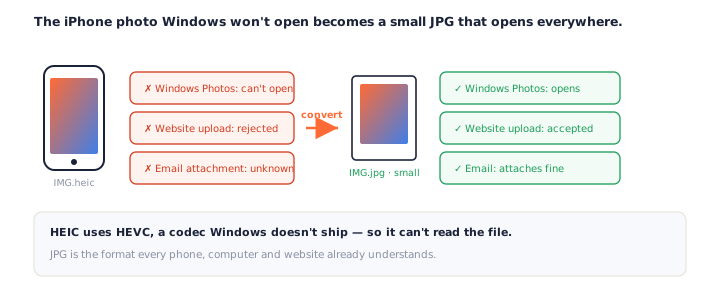
iPhones save photos as HEIC to fit more on the device. It is small and high quality, but it is built on HEVC — a codec Windows does not include by default — so File Explorer, older editors and many websites simply cannot read it.
The photo is fine; the software just cannot decode it. Rather than hunt for a codec pack or a driver update for one stubborn program, convert HEIC to JPG once and the image opens in every one of them.
Why JPG Is the Right Choice for iPhone Photos
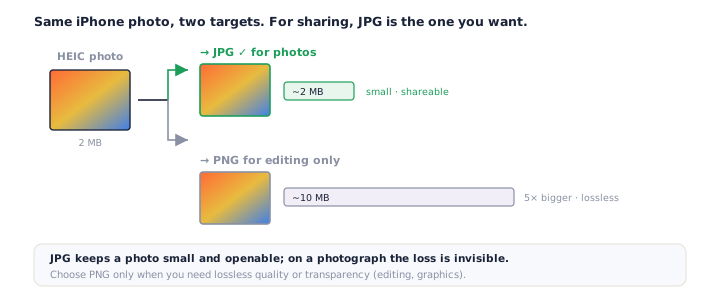
You can turn a HEIC into a PNG or a JPG. For an ordinary photo, JPG is almost always the one you want.
Small enough to actually use
A photo converted to PNG comes out several times larger, because PNG is lossless. A JPG stays small — the same kind of size the HEIC was — so it emails, uploads and shares without a fuss.
That is the whole reason to convert HEIC to JPG rather than to PNG: you get a file that opens everywhere and is a sensible size, and on a photograph the difference in quality is invisible.
It is the same reason cameras and phones have shot JPG for decades. A photograph is all smooth tones and gradients, which JPEG compresses beautifully — so a HEIC to JPG conversion hands you something small enough to text, attach or upload without a second thought.
When to choose PNG instead
Reach for PNG only when you need lossless quality or transparency — editing a graphic, say, rather than keeping a snapshot. For that, the HEIC to PNG converter is the tool; for everything else, a JPG is lighter and just as good to look at.
Your Photos Stay on Your Device
HEIC files are personal photos, so where they go matters more than with any other format.
Decoded in your browser, never uploaded
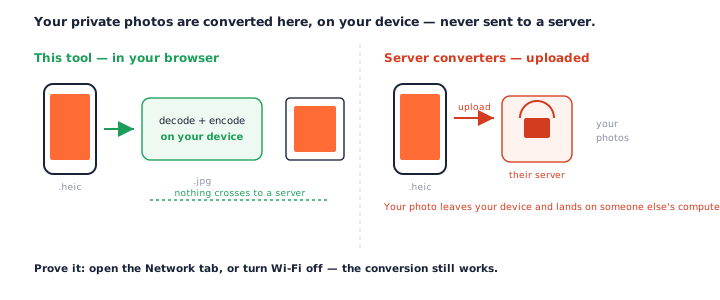
Many HEIC converters send your photos to a server and promise to delete them later. This one does not send them at all. The decoder runs in your browser, so converting HEIC to JPG keeps a private photo on your device — and it works with your Wi-Fi off.
For camera-roll photos — faces, homes, screenshots of private messages — that is the difference between a quick fix and handing your pictures to a stranger's computer. A local HEIC to JPG conversion never puts you in that position.
Why the first photo takes a moment
No browser reads HEIC on its own, so a decoder loads the first time you convert — a one-time wait of a second or two. After that, decoding is quick and re-encoding at a new quality is instant. The card shows a Decoding… step so nothing looks stuck.
Quality and Orientation: What Survives the Conversion
Two things people worry about, and both are handled.
Quality is a dial you control
JPG is lossy, but the slider decides how much detail it trades for size, and the meter shows the result live. At 85 and up a photo is hard to tell from the original; drop lower only when a smaller file matters more than a perfect one.
Portrait photos stay upright
HEIC stores which way the photo was taken, and the decoder applies it — so a portrait shot comes out upright instead of on its side. That rotation bug is a common complaint with lesser converters, and it is handled here.
Between the two — a quality you set and an orientation that just works — a HEIC to JPG conversion leaves you with a photo that looks exactly as you shot it, in a format anything will open.
Convert a Whole Roll of iPhone Photos
Nobody has just one HEIC. Drop up to 50 at a time and they convert together.
One at a time, so a tab doesn't run out of memory
iPhone photos are large, and decoding a pile at once can exhaust a browser tab. So they decode one after another, each showing its own progress, and Download All saves every JPG in a single zip. Because a batch HEIC to JPG conversion runs on your device, the only limit is your own memory — no upload cap, no paywall.
Frequently Asked Questions
Is this HEIC to JPG converter really free?
Yes, completely. No signup, no watermark, no daily cap. Every HEIC to JPG conversion runs on your own device, so there is nothing to meter.
Do my photos get uploaded when I convert HEIC to JPG?
No — and it matters, because these are personal iPhone photos. They are decoded and re-encoded entirely in your browser and never sent to a server. Open the Network tab or turn off Wi-Fi and it still works. See our privacy policy.
Why won’t Windows open my HEIC photos?
HEIC uses HEVC compression, and Windows does not include the codec by default, so File Explorer and older apps cannot read it. Converting HEIC to JPG gives you a file that opens everywhere without installing anything.
Should I convert HEIC to JPG or to PNG?
For a normal photo, JPG is almost always the better choice — small enough to email, upload and share, with no loss you can see. Convert to PNG only when you need lossless quality or transparency, since a HEIC to PNG conversion produces a much larger file. See our HEIC to PNG converter.
Will converting HEIC to JPG lose quality?
A little, because JPG is lossy — but you control how much with the quality slider, and at 85 or above it is invisible on a photo. The size updates live so you can find the point where the file is small and still looks perfect.
How much smaller is the JPG?
HEIC is already very efficient, so a JPG at high quality is often a similar size or a touch larger than the HEIC — but a fraction of what the same photo would be as a PNG. The win is compatibility at a sensible size, not beating HEIC on bytes.
Does it keep the photo’s orientation?
Yes. Portrait photos come out upright — the decoder applies the rotation stored in the HEIF file, so a vertical photo is not turned on its side.
Can I convert a whole roll of iPhone photos at once?
Yes, up to 50 at a time. They decode one after another to keep memory in check, each shows its progress, and Download All saves every JPG as one zip.
More Free Converter Tools
This HEIC to JPG converter is part of a family of free, in-browser tools on pngconvert.net — same privacy promise, no accounts, no uploads. The web's other awkward format converts the same way: see WebP to JPG:
Turn PNG images into multi-size Windows icons and favicons.
JPG to ICOCrop a photo square, drop its background, and get a Windows icon.
SVG to ICODraw a vector at every icon size, and see what it loses first.
WebP to ICOEvery size in one icon — and pick the frame if it is animated.
PNG to CURA Windows cursor with the click point set exactly — test it before you download.
PNG to ICNSA complete macOS icon — all ten Retina sizes, no Mac needed.
ICO to PNGExtract every size from an ICO file as separate PNG images.
WebP to PNGUnpack WebP to a transparent PNG — one frame, every frame, or an APNG.
SVG to PNGRasterize a vector to PNG at any size — 1x, 2x, 3x or a custom width.
AVIF to PNGTurn an AVIF your software won’t open into a PNG that works everywhere.
HEIC to PNGConvert iPhone HEIC photos to PNG in your browser — nothing uploaded.
GIF to PNGOne frame, every frame as a zip, or an animated PNG — you choose.
JPG to PNGLossless PNG from a JPG — and a flat background keyed to transparency.
PNG to WebPShrink PNG to WebP and watch the size drop live — lossy or lossless.
PNG to GIFA GIF encoded in your browser — one still, or several PNGs as one animation.
WebP to GIFAnimated WebP to a GIF that plays anywhere — every frame kept, Safari included.
PNG to JPGConvert PNG to JPG — pick what fills transparent areas, see the size drop.
WebP to JPGConvert WebP to a JPG that opens anywhere — you pick what fills the transparency.
AVIF to JPGA JPG that every app and upload form accepts — with the real size change shown.
JFIF to JPGA JFIF is already a JPEG — rename it without losing a byte, or re-encode.
Favicon GeneratorOne logo in, the favicon files you actually need out.