How to Convert PNG to ICNS in 3 Steps
An .icns file is what a Mac app, a disk image or a custom folder uses as its icon. Most people who need one are not on a Mac at all — they are building an Electron or Tauri app on Windows or Linux. This PNG to ICNS converter works the same everywhere.
- Add your PNG
Drop a square PNG into the box above — 1024 × 1024 is ideal — or paste it with
Ctrl+V. JPG, WebP and SVG work too; an SVG is drawn sharply at every size. - Check every size
Open the row to see all ten macOS representations, from 16 px to 1024 px, and a preview in a light and a dark Dock. Tick macOS app-icon shape if you want the image on Apple’s rounded square.
- Download the .icns
Press Convert to ICNS. The row lists every block inside the finished file, and you can also download the same images as an
.iconsetfolder for iconutil or Xcode.
Converting several logos from PNG to ICNS at once? Drop them all in; each becomes its own .icns, and the batch downloads as one zip.
PNG to ICNS on Windows, Linux and Mac
The page runs entirely in the browser, so a PNG to ICNS conversion works the same on every system — Chrome, Edge, Firefox or Safari, with nothing to install.
On Windows and Linux there is no built-in way to make an .icns at all, and
the command-line tools that exist need building or a package manager. On a
Mac, iconutil works but wants a folder of ten correctly named
PNGs first; here one image is enough.
Either way, the file you download is a standard .icns. Copy it to a Mac, commit it to your project, or attach it to a build — it behaves exactly like one made with Apple's own tool.
What's Inside an ICNS File
ICNS is Apple's icon container for macOS. One .icns file holds the same icon at up to ten sizes, from 16×16 to 1024×1024, so Finder and the Dock can pick a sharp version for every display — including Retina, where each size has an @2x twin.
Inside, every size is a separate block with a four-letter type code. Which codes a PNG to ICNS converter writes decides whether the icon looks right — and several online tools get it wrong.
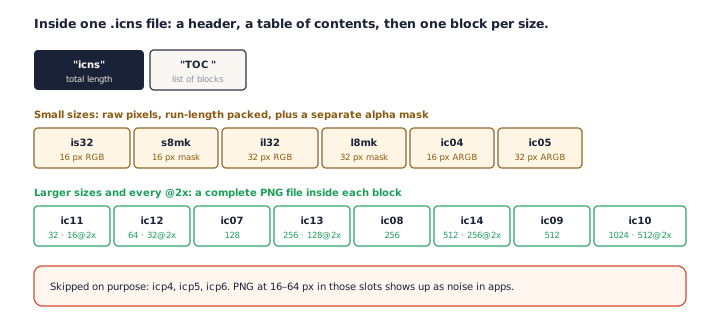
| .iconset file | Pixels | Block written | Stored as |
|---|---|---|---|
icon_16x16.png | 16 | is32 + s8mk, ic04 | RGB run-length + alpha mask; ARGB |
icon_16x16@2x.png | 32 | ic11 | PNG |
icon_32x32.png | 32 | il32 + l8mk, ic05 | RGB run-length + alpha mask; ARGB |
icon_32x32@2x.png | 64 | ic12 | PNG |
icon_128x128.png | 128 | ic07 | PNG |
icon_128x128@2x.png | 256 | ic13 | PNG |
icon_256x256.png | 256 | ic08 | PNG |
icon_256x256@2x.png | 512 | ic14 | PNG |
icon_512x512.png | 512 | ic09 | PNG |
icon_512x512@2x.png | 1024 | ic10 | PNG |
Why the two smallest sizes are not PNG
There are block types that hold a PNG at 16, 32 and 64 px — icp4, icp5 and icp6 — and some converters use them. Apps then draw those sizes as scrambled noise. electron-builder fixed exactly this bug by switching its small sizes to the older formats.
So this PNG to ICNS converter writes 16 and 32 px the way every macOS version reads them: run-length-compressed RGB with a separate 8-bit alpha mask, as Tauri's own icon writer does, plus an ARGB copy for macOS 11 and later. It never writes icp4–icp6.
What other converters actually write
We read the encoders behind several online tools. One writes only the four sizes from 128 to 1024 px while its page promises 16 to 1024. Another writes a single size — the one closest to your image — and stretches non-square images to fit. That is why every row here lists the blocks inside the finished file: you can see that nothing is missing.
Which PNG Sizes Do You Need?
For PNG to ICNS, one square PNG at 1024 × 1024 is enough. The converter draws the other nine sizes from it with stepped downsampling, which keeps small sizes crisp instead of blurry.
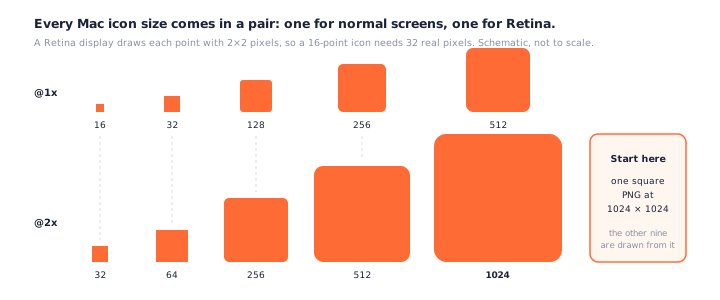
The @2x names mean Retina. A Retina display draws each point with 2 × 2 pixels, so the 16-point icon needs 32 real pixels. Apple's own documentation puts it plainly: "There is no longer a 1024x1024 size. That's replaced by 512x512@2x."
You do not need all ten — Apple says the system picks the best representation available — but a complete set is what keeps the icon sharp in every place macOS shows it. A source smaller than 1024 still makes a valid PNG to ICNS conversion; the slots that had to be upscaled are marked in the grid.
Got an SVG? Use it. A vector source is drawn directly at each size, the same advantage our SVG to ICO converter uses for Windows icons.
Making an ICNS Without a Mac
On a Mac, Apple's iconutil turns a folder of PNGs into an .icns. It does not exist
on Windows or Linux, which is why "iconutil for Windows" is a common search. A browser-based PNG
to ICNS conversion fills that gap.
Already have an .iconset folder?
Use Build one .icns from it under the drop area and pick the folder. Files named
the Apple way — icon_32x32@2x.png and so on — go into their exact slots, and any
missing size is drawn from the largest image you provided. It is the iconutil step, done as
a PNG to ICNS conversion in a browser.
Electron (electron-builder)
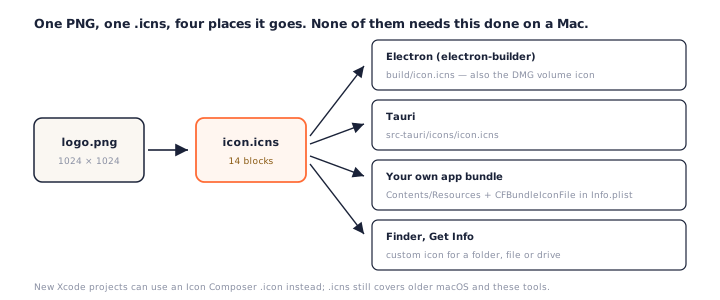
Put the result of the PNG to ICNS conversion at build/icon.icns. electron-builder can also convert a PNG itself and
now accepts Apple's newer .icon format, but that route needs Xcode 26 on a Mac to
build. The disk-image (DMG) volume icon still uses .icns.
Tauri
Tauri expects src-tauri/icons/icon.icns. Its tauri icon command
generates one from a square PNG, writing the same set of ten sizes this PNG to ICNS
converter does.
Xcode and Icon Composer
New Xcode projects use an asset catalog or an Icon Composer .icon file instead of
a hand-made .icns. An .icns is still the format for older macOS versions, scripts and the tools
above.
Using Your ICNS on macOS (Including Tahoe)
In an app bundle, the .icns from a PNG to ICNS conversion goes in
Contents/Resources and is named in
Info.plist under CFBundleIconFile. For a folder, a drive or a single
file, select it in Finder, press Cmd + I, and drag the .icns onto the small
icon at the top left of the Info window.
macOS 26 Tahoe changed how app icons look. Apple's guidelines now say the system applies its own rounded-square mask, and icons that do not fill that shape are shrunk onto a grey tile. Custom icons set through Get Info are not affected.
If you are making an app icon, tick macOS app-icon shape: the PNG to ICNS converter places your image on a white rounded square laid out on Apple's 824-in-1024 grid. It matches the shape, but Apple publishes no rule for what counts as conforming, so check the result on your target macOS version.
PNG to ICNS vs PNG to ICO
PNG to ICNS gives you the Mac format and PNG to ICO the Windows one; neither system reads the other's. A cross-platform app needs both from the same artwork — make the Windows icon with the PNG to ICO converter, and a website's icons with the favicon generator. Windows cursors have a format of their own, which the PNG to CUR converter builds.
Frequently Asked Questions
Is this PNG to ICNS converter free? Do I need a Mac?
It is free, with no account, and it runs in any modern browser — on Windows, Linux or a Mac. The .icns file is built on your own device.
Is my PNG uploaded?
No. For each PNG to ICNS conversion, your browser draws every size and writes the .icns file locally. Nothing is sent to a server, so it also works offline once the page has loaded.
What size should my PNG be?
A square 1024 × 1024 PNG gives the best PNG to ICNS result. That is the largest representation in an .icns (512 points at Retina density), so every other size is drawn down from it. Smaller sources work, but the biggest sizes are upscaled and the converter marks them.
Does the ICNS keep transparency?
Yes. The PNG sizes keep full alpha, and the two smallest sizes store a separate 8-bit alpha mask, so soft edges and shadows survive at every size.
Why does my app icon look like a small square in a grey box on macOS Tahoe?
macOS 26 applies its own rounded-square shape to app icons and shrinks icons that do not fill it onto a grey tile. Custom folder and file icons set with Get Info are not affected. For new apps, Apple’s Icon Composer format is the way to match the system style.
Can I use this ICNS with Electron or Tauri?
Yes. Save the PNG to ICNS result as build/icon.icns for electron-builder or src-tauri/icons/icon.icns for Tauri. Both tools can also generate one from a PNG, but a ready-made file is used as-is.
Can I convert ICNS back to PNG?
Not on this page — it only writes ICNS. For icon files from Windows, the ICO to PNG converter extracts every size.
Do I need an ICO file for Windows too?
Yes — Windows does not read ICNS. Use the PNG to ICO converter with the same image to get the Windows icon.
More Free Converter Tools
This PNG to ICNS converter is part of a family of free, in-browser tools on pngconvert.net — same privacy promise, no accounts, no uploads:
Turn PNG images into multi-size Windows icons and favicons.
JPG to ICOCrop a photo square, drop its background, and get a Windows icon.
SVG to ICODraw a vector at every icon size, and see what it loses first.
WebP to ICOEvery size in one icon — and pick the frame if it is animated.
PNG to CURA Windows cursor with the click point set exactly — test it before you download.
ICO to PNGExtract every size from an ICO file as separate PNG images.
WebP to PNGUnpack WebP to a transparent PNG — one frame, every frame, or an APNG.
SVG to PNGRasterize a vector to PNG at any size — 1x, 2x, 3x or a custom width.
AVIF to PNGTurn an AVIF your software won’t open into a PNG that works everywhere.
HEIC to PNGConvert iPhone HEIC photos to PNG in your browser — nothing uploaded.
GIF to PNGOne frame, every frame as a zip, or an animated PNG — you choose.
JPG to PNGLossless PNG from a JPG — and a flat background keyed to transparency.
PNG to WebPShrink PNG to WebP and watch the size drop live — lossy or lossless.
PNG to GIFA GIF encoded in your browser — one still, or several PNGs as one animation.
WebP to GIFAnimated WebP to a GIF that plays anywhere — every frame kept, Safari included.
PNG to JPGConvert PNG to JPG — pick what fills transparent areas, see the size drop.
WebP to JPGConvert WebP to a JPG that opens anywhere — you pick what fills the transparency.
HEIC to JPGConvert iPhone HEIC photos to small, shareable JPGs — nothing uploaded.
AVIF to JPGA JPG that every app and upload form accepts — with the real size change shown.
JFIF to JPGA JFIF is already a JPEG — rename it without losing a byte, or re-encode.
Favicon GeneratorOne logo in, the favicon files you actually need out.